The Complete Field Visit Lifecycle: From Planning to Follow-Up
A practical guide to managing the complete field visit lifecycle for NGO and development programmes, from planning and site selection to monitoring, findings, corrective actions, review and follow-up.
A field visit is not complete when the monitoring officer leaves the site.
For an NGO, development programme, government project, or implementing partner, the visit is only one part of a larger operational process.
A well-managed field visit should answer a sequence of questions:
- Why is the visit being conducted?
- Which project or site is being visited?
- What needs to be assessed?
- Who is responsible for the visit?
- What happened during the visit?
- What evidence was collected?
- What findings were identified?
- What actions are required?
- Who owns those actions?
- When are they due?
- Were the actions completed?
- Were they actually effective?
- What should happen next?
This is the field visit lifecycle.
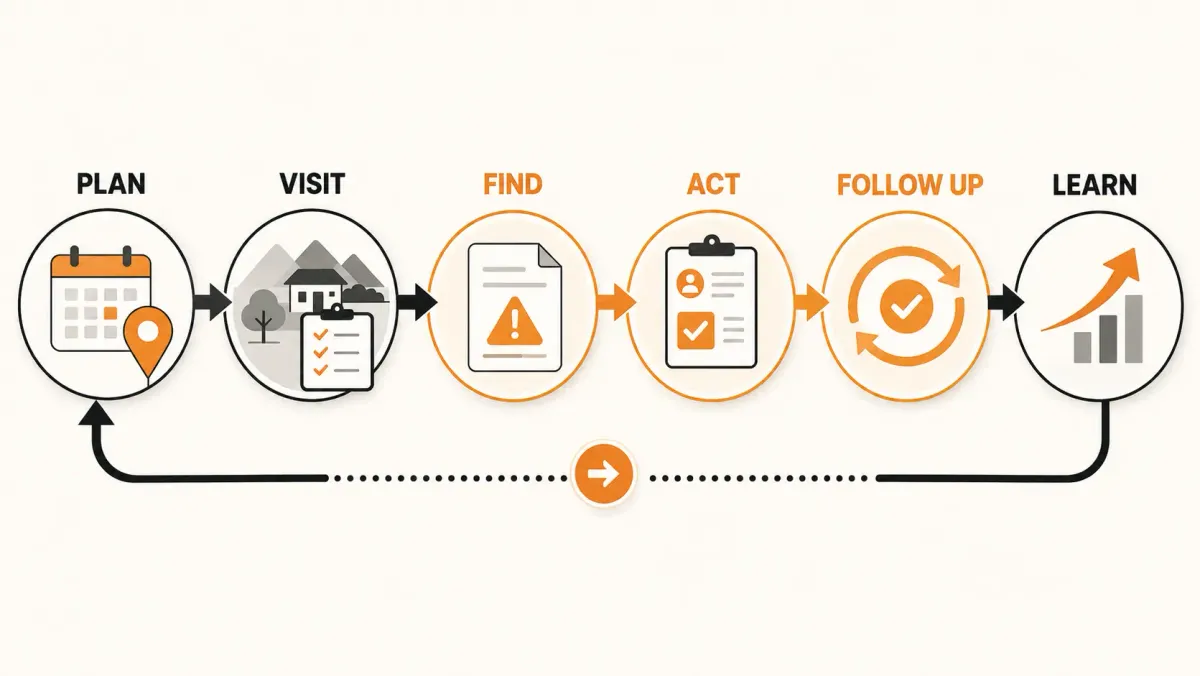
A useful way to think about the lifecycle is:
Plan → Assign → Prepare → Visit → Capture → Review → Findings → Actions → Follow-Up → Close → Learn
The exact stages vary between organizations, but the underlying principle is consistent:
A field visit should create a traceable operational record from the reason for the visit through to the actions and decisions that result from it.
Organizations such as UNICEF have implemented field-monitoring systems that cover multiple stages, including visit planning, conducting and documenting field visits, tracking follow-up, and closing actions. :contentReference[oaicite:2]{index=2}
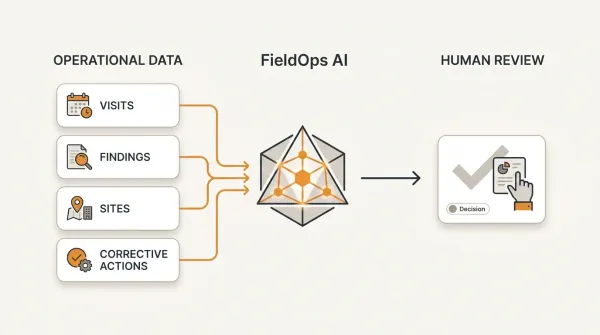
This article explains how to design that lifecycle and how a structured field-operations platform such as FieldOps can support it.
What is a field visit?
A field visit is a planned interaction with a project site, implementation location, facility, partner, community, or other operational location to assess implementation, verify information, observe activities, collect evidence, identify issues, and support management decisions.
Depending on the organization and programme, a field visit may also be called:
- monitoring visit;
- supervision visit;
- site visit;
- field monitoring visit;
- programme monitoring visit;
- implementation support visit;
- supervisory visit;
- partner monitoring visit;
- verification visit.
The terminology differs, but the operational concept is similar.
A field visit is used to compare what is happening on the ground with what the project expects to happen.
Tools4dev, for example, describes monitoring visits as a way to check whether project activities are being implemented according to plan and to document discrepancies, findings and improvements. :contentReference[oaicite:3]{index=3}
Why the field visit lifecycle matters
Many organizations have a field-visit form.
Fewer have a complete field-visit workflow.
That distinction is important.
A form answers:
"What information should the field officer enter?"
A lifecycle answers:
"What happens before, during and after the visit?"
Consider a typical situation.
An M&E officer visits a health facility.
They complete a checklist.
They identify three problems.
The form is submitted.
Then what?
If the process ends there, the organization has collected data but has not necessarily managed the problem.
A complete workflow continues:
Visit
→ findings
→ responsible owners
→ deadlines
→ follow-up
→ verification
→ closure
The monitoring visit therefore becomes part of an operational management process rather than a standalone data-collection event.
The 10 stages of a complete field visit lifecycle
A practical lifecycle can be organized into ten stages:
- Plan
- Assign
- Prepare
- Conduct
- Capture
- Review
- Record findings
- Create and manage actions
- Follow up and verify
- Close and learn
These stages should not necessarily be treated as rigid software screens.
They are a way of ensuring that important operational steps are not lost.
Stage 1: Plan the field visit
Every effective field visit begins with a reason.
The organization should know what the visit is intended to accomplish.
Possible objectives include:
- assessing implementation progress;
- verifying reported results;
- checking compliance with project requirements;
- supervising service delivery;
- assessing partner performance;
- verifying assets or activities;
- investigating a reported problem;
- reviewing data quality;
- following up on previous findings;
- providing implementation support;
- or collecting evidence for management decisions.
The visit should therefore have a defined purpose before someone is sent into the field.
A field visit plan should answer
At minimum:
- What project is being monitored?
- Which site will be visited?
- What is the purpose?
- What should be assessed?
- Who will conduct the visit?
- When should it happen?
- What information or evidence is required?
- Are there previous findings that require follow-up?
A monitoring-visit planning process commonly includes defining who will participate, what activities will be conducted, and which results or measures will be assessed. :contentReference[oaicite:4]{index=4}
Stage 2: Assign the visit
Once a visit is planned, responsibility needs to be clear.
A visit should have an assigned person or team.
For example:
Project: Community Health Strengthening Programme
Site: Kijiji Health Centre
Visit type: Routine monitoring
Visit date: 15 September
Lead monitor: M&E Officer
Supporting staff: Programme Officer
This creates accountability before the visit happens.
Without assignment, a visit can remain an item on a plan without a clear owner.
Stage 3: Prepare for the visit
Preparation is often overlooked.
A monitoring officer should not arrive at a site without understanding its history.
Before the visit, the team may need to review:
- previous monitoring visits;
- previous findings;
- outstanding corrective actions;
- project targets;
- site performance;
- previous reports;
- relevant indicators;
- implementation plans;
- and any issues requiring special attention.
This is where a site history becomes valuable.
Imagine that a monitoring officer is visiting Site A for the fourth time.
The previous three visits identified:
Visit 1: Documentation gaps.
Visit 2: Stock-management issue.
Visit 3: Documentation gap again.
That history should influence Visit 4.
The officer should not approach the site as though it has never been monitored before.
Why historical context matters
A field visit without historical context can produce fragmented monitoring.
The current visit may say:
"Documentation incomplete."
But the historical record may show:
"Documentation incomplete for the fourth consecutive visit."
Those are operationally different situations.
The first suggests an observation.
The second suggests a recurring problem requiring investigation.
A complete field visit lifecycle therefore connects the current visit to previous visits.
Stage 4: Conduct the field visit
The visit itself is the point at which the monitoring team gathers evidence.
Depending on the programme, this may involve:
- reviewing records;
- observing activities;
- interviewing staff;
- speaking with beneficiaries;
- inspecting facilities;
- checking stock;
- verifying reported information;
- reviewing documents;
- assessing implementation;
- collecting measurements;
- or completing a structured monitoring template.
The exact methods depend on the purpose of the visit.
The important principle is that the visit should produce evidence relevant to its objectives.
Standardize what is assessed
If five M&E officers monitor the same type of facility, the organization should be able to obtain reasonably comparable information.
That requires some level of standardization.
A monitoring template might contain sections such as:
Programme implementation
- activities completed;
- activities delayed;
- implementation challenges.
Service delivery
- availability;
- quality;
- staffing;
- equipment.
Data quality
- completeness;
- consistency;
- timeliness;
- supporting documentation.
Compliance
- required procedures;
- documentation;
- approvals;
- safeguards.
Follow-up
- previous findings;
- action status;
- evidence of resolution.
The exact structure should reflect the programme.
Standardization does not mean removing professional judgment
A monitoring template should provide structure.
It should not prevent a monitor from recording an unexpected issue.
A good system therefore combines:
Structured data
with:
Narrative explanation
For example:
Finding category: Data quality
Severity: Medium
Observation: Monthly report contains inconsistent beneficiary totals.
Evidence: Reviewed monthly register and submitted report.
This makes the information both analyzable and understandable.
Stage 5: Capture the visit record
The visit should create a durable record.
At minimum, the record should identify:
- project;
- site;
- visit type;
- visit date;
- monitor;
- objectives;
- monitoring template;
- responses;
- observations;
- evidence;
- findings;
- and follow-up requirements.
The goal is to make the visit reconstructable later.
A year later, someone should be able to answer:
"What happened during the September monitoring visit to this site?"
without relying on the memory of the person who conducted it.
A visit should have a clear status
Organizations may use different statuses, but a typical lifecycle might include:
Draft
The visit has been created but not submitted.
↓
Submitted
The field team has completed the visit.
↓
Under Review
The submission is being checked.
↓
Reviewed
The visit has passed the review process.
↓
Approved
The visit record is accepted as final.
This prevents incomplete or unreviewed information from automatically being treated as final management information.
Stage 6: Review the visit
A submitted visit should not necessarily go directly into management reporting.
A review stage can check:
- completeness;
- data quality;
- unusual values;
- missing evidence;
- findings;
- required actions;
- and consistency with the monitoring objectives.
This is especially important when field data will influence management decisions.
The review can also determine whether additional clarification is needed from the field team.
Why review matters
Suppose a field officer records:
Site performance: 95%
but also records:
Five critical findings.
The combination deserves attention.
A review process can identify such inconsistencies before the information is treated as final.
Review is therefore a quality-control stage.
Stage 7: Turn observations into findings
Not every observation is necessarily a finding.
A finding should identify an issue that requires attention, explanation, correction, or management consideration.
For example:
Observation
Two records were missing signatures.
Finding
Required beneficiary records are not consistently completed and signed.
Severity
Medium.
The finding should be clear enough that someone can understand what needs to be addressed.
Good findings are specific
Compare:
"Data quality is poor."
with:
"The beneficiary register contains 14 records that cannot be reconciled with the monthly report."
The second finding is more useful because it identifies:
- what is wrong;
- where the problem occurs;
- and what evidence supports it.
Good findings make better corrective actions possible.
Categorize findings consistently
A structured finding taxonomy allows organizations to analyze patterns.
For example:
Data quality
- incomplete;
- inconsistent;
- late;
- inaccurate.
Service delivery
- unavailable service;
- quality gap;
- coverage issue.
Documentation
- missing records;
- incomplete forms;
- missing approvals.
Supply management
- stock discrepancy;
- stock-out;
- inventory issue.
Compliance
- procedure not followed;
- required evidence missing;
- policy deviation.
The categories should be adapted to the organization's programme.
Stage 8: Create corrective actions
A finding should lead to an appropriate response when action is required.
For example:
Finding
Monthly reporting records cannot be reconciled with source documentation.
Corrective action
Reconcile the reporting records and implement a monthly verification procedure.
Owner
Site Manager.
Due date
30 September.
This creates a direct relationship:
Finding → Action
That relationship is essential.
Assign ownership
An action without an owner is difficult to manage.
The owner should be the person or role responsible for ensuring the action is completed.
For example:
- Site Manager;
- Project Manager;
- Programme Officer;
- Data Officer;
- Partner Organization;
- M&E Manager.
The exact role depends on the issue.
The important thing is that responsibility is explicit.
Set deadlines
Actions should have expected completion dates.
For example:
Action: Replace damaged cold-chain monitoring equipment.
Owner: Facility Manager.
Due: 20 September.
A deadline allows the organization to distinguish between:
Open
and:
Overdue
That distinction is operationally important.
Track action status
A useful action workflow might include:
Open
→
In Progress
→
Submitted for Verification
→
Verified
→
Closed
Organizations may also use:
Overdue
when a deadline has passed.
The exact statuses can vary.
The important principle is that management should be able to see what is happening with outstanding actions.
Stage 9: Follow up
The field visit does not end when the report is submitted.
Follow-up determines whether the required response actually happened.
For example:
Finding
Missing supporting documentation.
Action
Upload and reconcile missing documents.
Owner
Project Officer.
Due
15 September.
Follow-up
Evidence reviewed on 20 September.
Result
Resolved.
This closes the loop.
Monitoring guidance commonly emphasizes follow-up of management responses and outstanding findings rather than treating the report as the endpoint of the process. :contentReference[oaicite:5]{index=5}
Completion is not the same as verification
This distinction is important.
An action can be marked:
Completed
because the responsible person says it has been done.
But the M&E team may still need to verify the evidence.
For example:
"Staff training completed."
The organization may need evidence such as:
- attendance record;
- training materials;
- assessment results;
- or subsequent monitoring evidence.
Only then can it determine whether the action was adequately addressed.
Stage 10: Close the visit
A field visit should have a defined closure condition.
For example:
A visit might be considered closed when:
- the visit has been reviewed;
- significant findings have been recorded;
- required actions have been assigned;
- required follow-up has been completed;
- unresolved issues have been escalated;
- and the record has been finalized.
Closure does not necessarily mean that every underlying programme problem has disappeared.
It means the visit's required workflow has reached its defined endpoint.
An unresolved action should remain visible
Suppose a visit identifies:
5 actions
Four are resolved.
One remains outstanding.
The visit history should not make the unresolved issue disappear simply because the visit itself is old.
The outstanding action should remain visible until it is:
- resolved;
- formally deferred;
- superseded;
- or escalated according to organizational policy.
This prevents historical issues from disappearing into archived reports.
The field visit lifecycle is a continuous loop
The lifecycle is not really a straight line.
It is a loop:
Plan
↓
Prepare
↓
Visit
↓
Capture
↓
Review
↓
Findings
↓
Actions
↓
Follow-Up
↓
Close
↓
Learn
↓
Plan the next visit
The next visit should benefit from the previous one.
That is where a monitoring system becomes more valuable over time.
The next visit should use the previous visit's history
Consider a site with three previous visits.
Visit 1
Finding: Incomplete records.
Action: Staff refresher training.
Visit 2
Finding: Incomplete records.
Action: Supervisor review introduced.
Visit 3
Finding: Records improved.
New finding: Delayed monthly reporting.
The fourth visit should not start from a blank page.
The M&E officer should be able to see:
- previous findings;
- previous actions;
- resolved issues;
- recurring issues;
- outstanding actions;
- and the site's monitoring history.
That is longitudinal monitoring.
Why spreadsheets often become difficult at this stage
A spreadsheet can record a visit.
It can also track actions.
The challenge grows when an organization has:
- many projects;
- many sites;
- many visits;
- many findings;
- multiple action owners;
- multiple monitoring teams;
- and several years of history.
The organization may eventually have:
Visits.xlsx
Findings.xlsx
Actions.xlsx
Site list.xlsx
Monitoring reports.xlsx
Follow-up tracker.xlsx
The information exists.
But the relationships between the records become increasingly difficult to maintain.
The question:
"Show me all unresolved high-severity findings from sites that have not been monitored in the last six months."
may require manually joining information from multiple sources.
The problem is not that spreadsheets cannot store data.
The problem is maintaining an operational workflow around that data.
A structured field visit model
A stronger operational model connects:
Organization
→
Program
→
Project
→
Site
→
Visit
→
Finding
→
Action
→
Follow-Up
This structure makes it possible to answer questions such as:
- Which sites were visited this month?
- Which visits are still under review?
- Which sites have recurring findings?
- Which actions are overdue?
- Which project has the most unresolved findings?
- Which sites have not been monitored recently?
- Which findings were resolved after follow-up?
- Which sites require another visit?
The answers become much easier when the underlying relationships are explicit.
Field visit management is different from data collection
A digital form can collect:
- date;
- location;
- responses;
- observations;
- photos;
- signatures;
- and other field information.
That is valuable.
But field visit management goes further.
It needs to manage the process around the data.
A complete workflow includes:
Planning
Assignment
Monitoring
Review
Findings
Actions
Follow-up
Closure
This distinction matters because collecting information is only one part of managing field operations.
KoboToolbox and ODK can remain part of the workflow
Organizations do not necessarily need to abandon their existing data-collection tools.
KoboToolbox and ODK can continue to serve as field data-collection systems.
The operational question is:
What happens to the information after collection?
For example:
KoboToolbox
→ field submission
→ project/site context
→ monitoring visit
→ review
→ finding
→ corrective action
→ follow-up
The same principle applies to ODK.
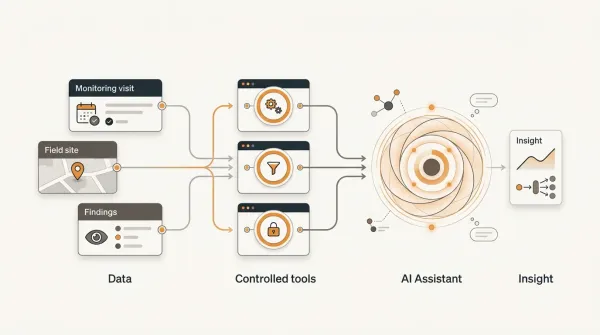
FieldOps can therefore act as an operational layer around existing field-data sources rather than requiring an organization to replace every collection tool.
FieldOps currently supports native forms as well as bringing in data from Excel, KoboToolbox and ODK Central into structured visit workflows. :contentReference[oaicite:6]{index=6}
Field visits and DHIS2 can serve different purposes
DHIS2 can provide routine programme data and indicators.
A field visit provides an opportunity to investigate what is happening at the implementation level.
Consider:
DHIS2
Performance indicator is below target.
↓
FieldOps
Identify affected project sites.
↓
Field visit
Investigate implementation.
↓
Finding
Service delivery gap identified.
↓
Action
Site-level corrective action assigned.
↓
Follow-up
Implementation verified.
↓
Performance
Subsequent data reviewed.
This creates a relationship between routine data and operational monitoring.
It does not require treating the two systems as competitors.
Use the lifecycle to prioritize management attention
Once field visits are structured, organizations can begin asking higher-level questions.
For example:
Which sites have the most unresolved findings?
Which projects have the most overdue actions?
Which sites have recurring problems?
Which sites have not been visited recently?
Which monitoring visits are still awaiting review?
Which findings have remained open longest?
Which actions repeatedly fail verification?
These questions transform field-visit records into management information.
A practical field visit lifecycle example
Consider a health programme managing 80 facilities.
Step 1: Plan
The programme schedules quarterly monitoring visits.
Step 2: Prioritize
Sites with unresolved findings and declining performance receive additional attention.
Step 3: Assign
An M&E officer is assigned to each visit.
Step 4: Prepare
The officer reviews the site's previous monitoring history.
Step 5: Conduct
The officer visits the facility and completes the monitoring template.
Step 6: Review
The submission is checked for completeness and consistency.
Step 7: Findings
Three findings are recorded.
Step 8: Actions
Four corrective actions are assigned to responsible staff.
Step 9: Follow-up
Evidence is reviewed and actions are verified.
Step 10: Close
The visit is finalized, while any unresolved issues remain visible.
Next cycle
The site's history is available when the next monitoring visit is planned.
This is a complete operational loop.
What a good field visit management system should provide
A field visit management system should make it possible to manage at least five things.
1. Context
Know which organization, programme, project and site the visit belongs to.
2. Workflow
Know where the visit currently sits in its lifecycle.
3. Evidence
Know what was observed and what supports the observation.
4. Accountability
Know who owns the resulting actions.
5. History
Know what happened during previous visits.
These five capabilities turn individual field visits into an operational system.
Common field visit management mistakes
Mistake 1: Treating the visit as the end point
The report is filed and nobody tracks what happens next.
Better approach: Connect findings to actions and follow-up.
Mistake 2: Starting every visit from scratch
The monitor does not review previous site history.
Better approach: Make previous visits and outstanding actions part of visit preparation.
Mistake 3: Recording findings without ownership
The issue is documented but nobody is responsible for resolving it.
Better approach: Assign every action to a responsible person or role.
Mistake 4: Treating completed actions as automatically resolved
Someone marks an action complete and the issue disappears.
Better approach: Introduce verification.
Mistake 5: Using inconsistent monitoring tools
Different officers assess the same sites using different questions.
Better approach: Use standardized monitoring templates where comparability is required.
Mistake 6: Keeping visits isolated from project structure
A report may contain a site name but not a reliable relationship to the project or programme.
Better approach: Maintain explicit relationships between organization, programme, project, site and visit.
Mistake 7: Archiving history without using it
Historical reports exist but are not considered during future visits.
Better approach: Make monitoring history part of planning and preparation.
How FieldOps supports the field visit lifecycle
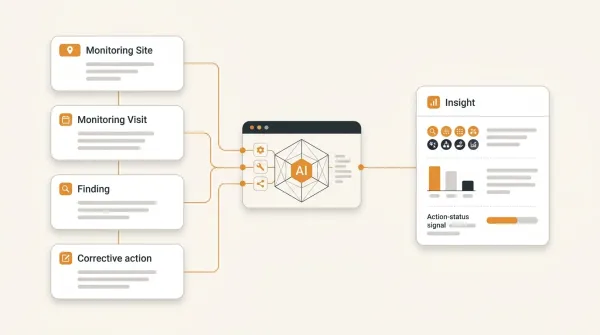
FieldOps is designed around the operational relationship between:
Program
→
Project
→
Site
→
Visit
→
Finding
→
Action
This allows a field visit to exist as part of a broader operational workflow rather than as an isolated form submission.
FieldOps provides capabilities for:
- field visit management;
- monitoring workflows;
- monitoring templates;
- project and site context;
- visit records;
- findings;
- corrective actions;
- review workflows;
- and reporting.
Its current platform positioning explicitly describes field visits as something teams can plan, capture and manage, while findings and corrective actions can be tracked within the same operational workflow. :contentReference[oaicite:7]{index=7}
Example FieldOps workflow
Imagine a project called:
National Community Health Strengthening Programme
It contains:
20 sites
A monitoring visit is created for:
Site 12
The visit contains:
Monitoring template: Facility supervision
Visit date: 15 September
Monitor: M&E Officer
The officer completes the visit.
The system records:
Findings: 4
Actions required: 6
The visit enters review.
The M&E manager reviews the submission.
The findings are confirmed.
Actions are assigned:
Action 1: Site Manager
Action 2: Programme Officer
Action 3: Data Officer
Action 4: Facility In-Charge
Action 5: Procurement Officer
Action 6: Project Manager
Each action receives a deadline.
The responsible people work on them.
Evidence is submitted.
The M&E team verifies the evidence.
Resolved actions are closed.
Outstanding actions remain visible.
When the next visit is planned, the monitoring team can review the site's previous history.
That is a field visit lifecycle.
Why the lifecycle matters more than the form
The form is only one component.
The real operational value comes from the relationships around it.
A field visit should connect:
Purpose
to:
Evidence
to:
Findings
to:
Actions
to:
Verification
to:
Learning
If those relationships are lost, organizations end up with large volumes of field data but limited operational visibility.
If the relationships are preserved, field visits become a source of structured management intelligence.
A field visit lifecycle checklist
Before implementing a field visit workflow, ask:
Planning
- Is every visit linked to a project and site?
- Is there a defined objective?
- Is the visit assigned to a responsible monitor?
- Are previous findings considered?
Preparation
- Can the monitoring team review site history?
- Can outstanding actions be identified?
- Is the appropriate monitoring template available?
Conduct
- Are the questions standardized?
- Can monitors record observations?
- Can supporting evidence be captured?
- Can unexpected findings be documented?
Review
- Are submissions reviewed?
- Can incomplete or inconsistent records be returned for correction?
- Are findings validated?
Actions
- Are findings linked to corrective actions?
- Does every action have an owner?
- Does every action have a deadline?
Follow-up
- Can action status be tracked?
- Can evidence be reviewed?
- Can completion be verified?
- Are overdue actions visible?
Closure
- Is the visit formally closed?
- Are unresolved actions still visible?
- Is the visit history preserved?
Learning
- Can the next visit use the previous visit's information?
- Can recurring findings be identified?
- Can management see patterns across sites and projects?
The real goal of field visit management
The objective is not to create more forms.
It is not to generate more PDFs.
It is not to collect more data simply because digital collection is available.
The objective is to create a reliable operational chain:
Plan
→ Visit
→ Observe
→ Record
→ Review
→ Find
→ Act
→ Verify
→ Learn
That chain is what turns field monitoring into operational management.
Frequently Asked Questions
What is the field visit lifecycle?
The field visit lifecycle is the complete process surrounding a field or monitoring visit, from planning and assignment through conducting the visit, capturing and reviewing information, recording findings, assigning actions, following up, verifying resolution and closing the visit.
What are the main stages of a field visit?
A practical lifecycle includes planning, assignment, preparation, conducting the visit, data capture, review, findings, corrective actions, follow-up, verification and closure.
Why is field visit follow-up important?
Without follow-up, organizations may know that a problem was identified but not whether it was addressed. Follow-up connects monitoring observations to corrective action and verification. UNICEF's field-monitoring approach explicitly includes follow-up and closure of actions as part of the monitoring process. :contentReference[oaicite:8]{index=8}
What should happen after a monitoring visit?
The visit should be reviewed, findings should be documented, required actions should be assigned, responsible owners and deadlines should be established, and follow-up should verify whether actions were adequately addressed.
What is the difference between a field visit and field data collection?
Field data collection focuses on obtaining information from the field. Field visit management covers the broader operational process around the visit, including planning, assignment, review, findings, actions and follow-up.
How do you manage field visits across multiple project sites?
Use a structured relationship between projects, sites and visits. Each visit should have a responsible monitor, planned date, purpose, monitoring template, status and historical record.
How do you track monitoring visits?
A monitoring system should maintain a record of each visit, including its project, site, date, monitor, status, findings, actions and follow-up requirements.
How do you track findings from field visits?
Each finding should be associated with the visit where it was identified and, where action is required, linked to one or more corrective actions with owners, deadlines and statuses.
What is the difference between a finding and a corrective action?
A finding describes an observed problem, gap, risk or condition. A corrective action describes what should be done in response.
Should completed corrective actions be verified?
Where appropriate, yes. Completion of an activity does not automatically demonstrate that the underlying issue has been resolved. Verification provides evidence that the required response was adequately addressed.
How can organizations maintain field visit history?
Maintain structured records linking each visit to the relevant project and site, while preserving findings, actions, verification and closure information. This creates a longitudinal monitoring history.
Can KoboToolbox be used for field visits?
Yes. KoboToolbox can be used for digital field data collection. Organizations may still need an operational workflow around the collected information for review, findings, corrective actions and follow-up.
Can ODK be used for field monitoring?
Yes. ODK can support structured field data collection. An organization may use a separate operational layer to manage the workflow surrounding visits, findings and actions.
Can DHIS2 and field monitoring work together?
Yes. Routine DHIS2 data can help identify performance issues, while field visits can provide site-level investigation, observations and corrective actions. The systems can therefore serve complementary roles.
What should a field visit management system provide?
At minimum, it should provide a structured way to plan visits, associate them with projects and sites, assign responsible staff, capture monitoring information, record findings, manage corrective actions, track follow-up and preserve visit history.
Does FieldOps replace KoboToolbox or ODK?
Not necessarily. FieldOps can work alongside existing data-collection systems. FieldOps currently supports native forms as well as integrations with KoboToolbox and ODK Central. :contentReference[oaicite:9]{index=9}
What does FieldOps add to a field visit workflow?
FieldOps connects field visits with project and site context, monitoring workflows, findings, corrective actions and reporting so that the visit becomes part of a broader operational record rather than an isolated submission. :contentReference[oaicite:10]{index=10}
Conclusion
A field visit should never be treated as simply a trip to a project site followed by a report.
It is a lifecycle.
The lifecycle begins before the monitor reaches the site:
Why are we going?
What are we monitoring?
Who is responsible?
It continues during the visit:
What did we observe?
What evidence did we collect?
What problems did we identify?
And it continues after the monitor leaves:
What needs to happen?
Who is responsible?
When is it due?
Was it completed?
Was it verified?
What should we do differently next time?
The strongest field-monitoring systems preserve this entire chain.
Plan → Assign → Prepare → Visit → Capture → Review → Findings → Actions → Follow-Up → Close → Learn
That is the complete field visit lifecycle.
For organizations managing multiple programmes, projects and sites, the value comes from making that lifecycle structured, traceable and repeatable.
FieldOps is built around that operational model, connecting projects and sites to field visits, monitoring workflows, findings, corrective actions and follow-up.
The goal is simple:
Do not let the field visit end when the monitor leaves the site.
The visit should continue until the organization has reviewed what happened, acted on what was found, verified the response, and carried the learning into the next monitoring cycle.
That is how a field visit becomes more than a report.
It becomes part of an operational system for improving programme implementation.
Move beyond data collection
FieldOps helps NGOs manage field visits, monitoring templates, findings, corrective actions, dashboards and donor reporting in one operational intelligence platform.
Learn more about FieldOps