Designing Better Monitoring Templates: A Practical Guide for Development Programmes
A well-designed monitoring template improves data quality long before reporting begins. Learn practical principles for building templates that help field teams collect consistent, reliable evidence across development programmes.

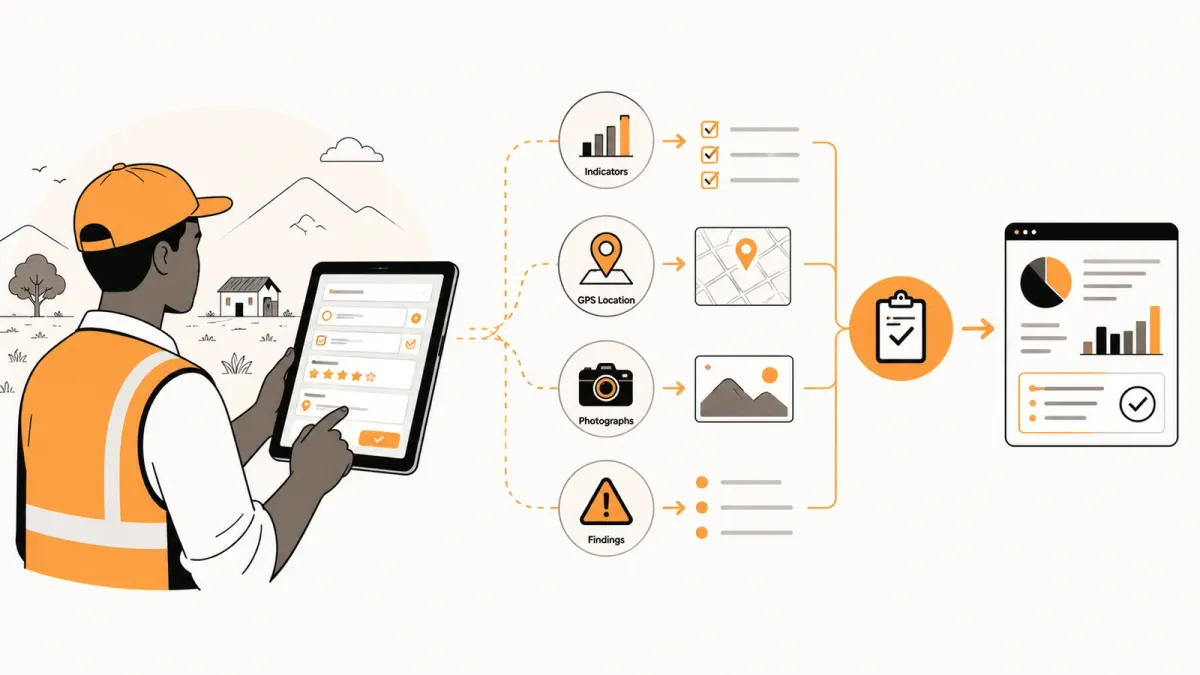
A monitoring template should make field work easier, not more complicated. The best templates help different teams collect consistent, reliable information while leaving enough flexibility to capture what matters in the field.
Key Takeaways
- A monitoring template is more than a questionnaire.
- Good template design improves data quality before analysis begins.
- Simplicity almost always beats complexity.
- Templates should support field teams, not slow them down.
- Standardisation makes reporting and comparison significantly easier.
Whether your organisation uses paper forms, Excel, KoboToolbox, ODK Central or another digital platform, one challenge remains remarkably consistent.
Poorly designed monitoring templates produce poor-quality information.
Most organisations only realise this after hundreds of field visits have already been completed.
Questions are interpreted differently.
Important evidence is missing.
Field officers skip sections because they are confusing.
Supervisors spend hours cleaning data before reporting can even begin.
The unfortunate part is that most of these problems are preventable.
They usually begin long before anyone visits a project site.
They begin when the monitoring template is designed.
A Monitoring Template Is Not Just a Form
Many people use the terms monitoring template, questionnaire and survey form interchangeably.
They're related, but they are not the same thing.
A questionnaire focuses on collecting answers.
A monitoring template guides an entire field visit.
It provides structure for what should be observed, measured, verified and documented.
| Questionnaire | Monitoring Template |
|---|---|
| Collects responses | Guides field activities |
| Focuses on questions | Focuses on evidence |
| Often survey-oriented | Supports operational monitoring |
| Ends with submission | Contributes to review, findings and reporting |
The quality of your dashboards will never exceed the quality of the monitoring template used in the field.
Why Good Templates Matter
Every monitoring system eventually reflects the quality of the template behind it.
A well-designed template creates consistency across programmes, regions and field teams.
A poorly designed template creates confusion that no dashboard or reporting tool can fully correct.
Consider two organisations monitoring the same school feeding programme.
The first asks:
- Was food delivered?
- How many learners attended?
- Were meals prepared?
The second asks the same questions but also captures:
- GPS location
- Time of visit
- Supporting photographs
- Food stock levels
- Hygiene observations
- Previous unresolved findings
- Follow-up actions required
Both organisations collect data.
Only one gathers enough evidence to understand what is really happening.
The Building Blocks of a Great Monitoring Template
An effective monitoring template balances simplicity with completeness.
Every section should have a clear purpose.
| Component | Why It Matters |
|---|---|
| Visit information | Identifies who, where and when |
| Programme details | Links the visit to the correct activity |
| Indicators | Measures expected results |
| Observations | Captures qualitative context |
| Supporting evidence | Builds confidence in findings |
| Findings | Highlights issues requiring attention |
| Recommendations | Suggests next steps |
If a section doesn't help someone make a decision later, ask whether it belongs in the template at all.
Every additional question increases the workload for field teams. Make every question earn its place.
Start With Decisions, Not Questions
One of the biggest design mistakes is starting with a blank form and brainstorming questions.
Instead, begin by asking:
"What decisions should this monitoring visit support?"
Those decisions determine:
- the indicators you need
- the evidence you should collect
- the questions worth asking
- the information that can safely be ignored
This simple shift produces shorter, more focused templates that are easier to complete and much easier to analyse.
A Practical Example
Imagine you're monitoring a rural health programme.
Instead of asking dozens of unrelated questions, group them around operational objectives.
| Objective | Example Questions |
|---|---|
| Medicine availability | Are essential medicines in stock? |
| Service delivery | Were planned services delivered today? |
| Infrastructure | Is critical equipment operational? |
| Staffing | Were required staff present? |
| Patient experience | Were any significant complaints raised? |
Field officers spend less time searching for the next question and more time observing what matters.
Keep Sections Logical
A good template follows the natural flow of a field visit.
For example:
- Visit details
- Site information
- Programme indicators
- Observations
- Photographs and supporting evidence
- Findings
- Recommendations
- Overall assessment
Jumping randomly between unrelated topics increases errors and slows down data collection.
A logical sequence feels natural because it mirrors how people work in the field.
Common Monitoring Template Mistakes
Even experienced organisations make mistakes when designing monitoring templates.
The problem isn't usually a lack of technical knowledge.
It's trying to collect everything "just in case."
The result is a form that is too long, too repetitive and too difficult to complete consistently.
Mistake 1: Asking Too Many Questions
Every additional question has a cost.
It increases the time spent in the field.
It increases fatigue.
It increases the likelihood that field officers skip questions or provide rushed answers.
Before adding a question, ask:
- Will this information influence a decision?
- Will someone analyse it later?
- Could it be collected another way?
If the answer is "no", consider removing it.
Mistake 2: Mixing Multiple Ideas Into One Question
Avoid questions such as:
"Is the classroom safe, clean and adequately equipped?"
If the answer is "No", what exactly is wrong?
Instead, separate the concepts.
- Is the classroom structurally safe?
- Is it clean?
- Is essential equipment available?
Clear questions produce clearer evidence.
Mistake 3: Using Ambiguous Language
Questions should be interpreted the same way by every field officer.
Avoid vague terms such as:
- adequate
- sufficient
- acceptable
- good
- poor
Instead, define measurable criteria wherever possible.
| Ambiguous | Better |
|---|---|
| Are enough medicines available? | Are all medicines on the essential medicines list currently in stock? |
| Is attendance good? | Did at least 90% of registered participants attend? |
Required vs Optional Fields
Not every question deserves the same importance.
Some information is essential.
Other information is useful but not critical.
| Required Fields | Optional Fields |
|---|---|
| Visit date | Additional comments |
| Project or site | Suggested improvements |
| Monitoring indicators | Contextual observations |
| GPS (where appropriate) | Supporting notes |
| Reviewer decision | Lessons learned |
Making every field mandatory often frustrates field teams.
Making too few mandatory reduces data quality.
Aim for the right balance.
Use Conditional Logic Carefully
Conditional logic keeps templates shorter by displaying questions only when they are relevant.
For example:
If the answer to:
"Was construction completed?"
is No, display:
- What percentage is complete?
- What is causing the delay?
- Is corrective action required?
If construction is complete, those questions never appear.
This reduces unnecessary work for field officers while still collecting detailed information when needed.
Conditional logic should simplify the field experience—not make the template difficult to understand.
Repeat Groups Reduce Repetition
Some monitoring activities involve collecting the same information several times.
For example:
- classroom inspections
- water points
- health facilities
- farmer groups
Rather than creating twenty identical sections, use repeat groups where your platform supports them.
This keeps templates shorter and much easier to maintain.
Validation Rules Improve Data Quality
Validation prevents obvious mistakes before data reaches supervisors.
Examples include:
- dates cannot be in the future
- percentages cannot exceed 100%
- GPS is required before submission
- photographs are mandatory for failed inspections
- numeric values must fall within expected ranges
Preventing errors during data collection is almost always easier than correcting them later.
Standardisation Across Programmes
As organisations grow, different programmes often create their own templates independently.
Over time this leads to:
- duplicated questions
- inconsistent terminology
- different response options
- incompatible reporting
Instead, create a shared library of standard questions and indicators wherever practical.
Programme-specific sections can always be added later.
This approach improves consistency while reducing the effort required to design future templates.
Monitoring Template Quality Checklist
Before approving a new template, ask:
- □ Does every question support a decision?
- □ Is the language clear and measurable?
- □ Are duplicate questions removed?
- □ Are required fields limited to essential information?
- □ Is conditional logic used appropriately?
- □ Does the template follow the natural flow of a field visit?
- □ Will different field officers interpret questions consistently?
A good monitoring template doesn't just collect information.
It makes high-quality monitoring easier for every member of the team.
One Template Doesn't Fit Every Programme
A common temptation is to build a single monitoring template that every programme must use.
While consistency is important, programmes rarely monitor exactly the same things.
A nutrition programme measures different outcomes from a road construction project.
A livelihoods project captures different evidence from a school inspection.
The solution is not to create completely different templates for every programme.
Instead, design a common foundation with programme-specific sections.
For example:
| Common Across All Programmes | Programme-Specific |
|---|---|
| Visit details | Technical indicators |
| GPS location | Sector-specific observations |
| Photographs | Compliance requirements |
| Findings | Programme outcomes |
| Corrective actions | Specialist evidence |
This approach keeps reporting consistent while giving each programme the flexibility it needs.
Build Templates for People, Not Software
It's easy to become distracted by what a platform can do.
Conditional logic.
Calculated fields.
Repeat groups.
Dynamic sections.
Those features are useful—but they should never dictate the design.
Start with the people who will actually use the template.
Ask questions such as:
- How long will this visit take?
- Will the field officer be standing in the rain?
- Will there be internet access?
- Will gloves or protective equipment make typing difficult?
- How much training will new users receive?
A template that looks perfect in an office can become frustrating in the field.
The best monitoring template is the one that people complete accurately and consistently—not the one with the most features.
Review Templates Regularly
Monitoring templates should evolve.
As programmes change, indicators change.
New risks emerge.
Reporting requirements develop.
Technology improves.
Rather than creating a template once and forgetting it, schedule regular reviews.
A simple annual review can answer questions such as:
- Which questions are rarely completed?
- Which fields generate poor-quality data?
- Which indicators are no longer useful?
- What information do managers still wish they had?
Continuous improvement keeps templates relevant without forcing field teams to adapt to constant change.
Governance Matters
As organisations grow, templates become organisational assets.
Without governance, different teams often create similar templates independently.
That leads to duplicated effort, inconsistent terminology and fragmented reporting.
Assign clear ownership.
Document changes.
Version templates.
Retire outdated versions.
A small amount of governance can prevent years of inconsistency.
Final Recommendations
If you're designing a monitoring template today, keep these principles in mind.
- Start with the decisions you need to support.
- Keep questions clear and measurable.
- Collect only information that creates value.
- Follow the natural flow of a field visit.
- Use validation to improve quality.
- Standardise wherever practical.
- Review and improve templates regularly.
These principles apply whether your organisation uses paper forms, Excel, KoboToolbox, ODK Central or an integrated operational platform.
Final Thoughts
Monitoring templates are often treated as simple data collection forms.
In reality, they shape the quality of every dashboard, report and management decision that follows.
Investing time in better template design pays dividends throughout the operational lifecycle.
Field teams spend less time completing forms.
Supervisors spend less time correcting errors.
Managers receive more reliable information.
Decision-makers gain greater confidence in programme performance.
Ultimately, better templates don't just improve data quality.
They improve the quality of operational decisions.
Move beyond data collection
FieldOps helps NGOs manage field visits, monitoring templates, findings, corrective actions, dashboards and donor reporting in one operational intelligence platform.
Learn more about FieldOps