Excel Isn't Your Monitoring System: Why Growing Programmes Eventually Outgrow Spreadsheets
Excel remains one of the most valuable tools for monitoring and reporting. But as development programmes grow, spreadsheets struggle to manage field visits, approvals, findings and corrective actions. Learn when Excel is enough—and when it's time to strengthen your operational workflow.

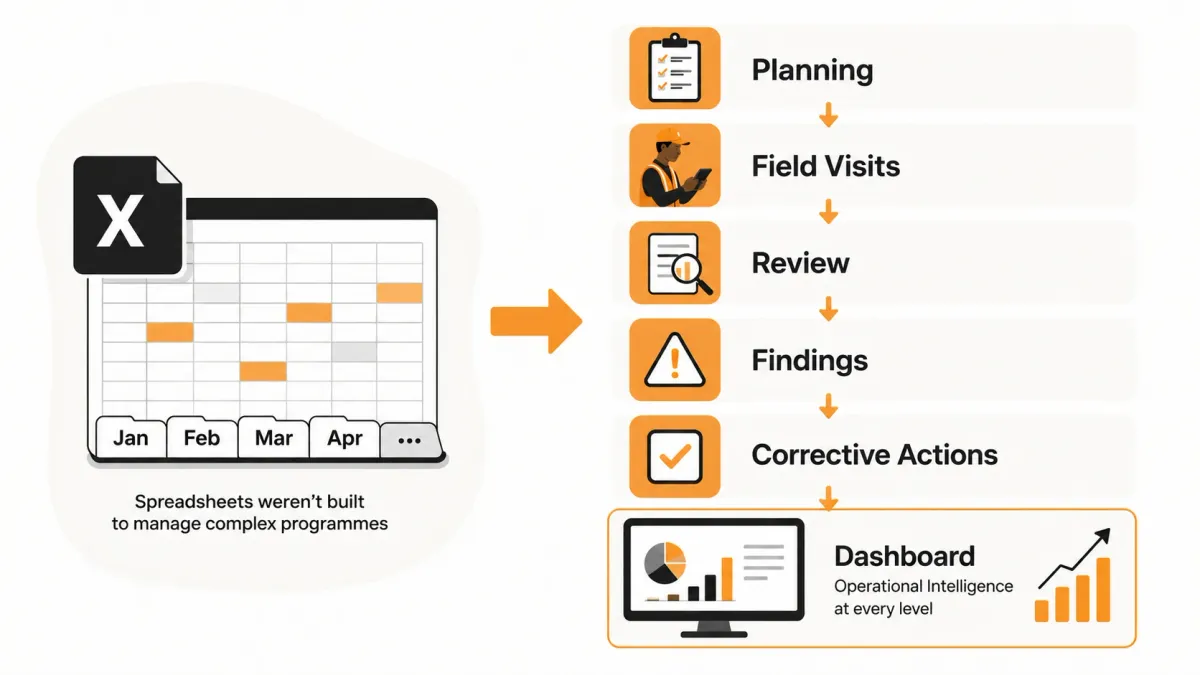
Excel is one of the most useful tools ever created. It has helped organisations plan budgets, analyse data and produce reports for decades. But as development programmes grow, many discover that spreadsheets were never designed to manage the complete field operations lifecycle.
Key Takeaways
- Excel remains an excellent analytical and reporting tool.
- Most organisations don't outgrow Excel—they outgrow spreadsheet-based workflows.
- Operational complexity increases faster than spreadsheets can comfortably handle.
- Version control, approvals and corrective actions become difficult to manage in Excel.
- Operational Intelligence complements Excel rather than replacing it.
Search for monitoring templates or project reporting tools and you'll quickly notice one constant.
Excel is everywhere.
Development programmes use it to plan activities.
Programme managers use it to track indicators.
Finance teams use it for budgets.
Monitoring teams export field data into Excel before cleaning, analysing and reporting it.
Even organisations with sophisticated data collection systems often rely on spreadsheets somewhere in the workflow.
There's a good reason for that.
Excel is incredibly flexible.
Almost everyone knows how to use it.
It integrates with virtually every reporting platform.
If you're analysing monitoring data, preparing donor reports or performing ad hoc analysis, Excel is still one of the best tools available.
So why do so many organisations eventually start searching for:
- monitoring software
- Excel alternatives
- field visit management software
- MEL software
- operational dashboards
The answer usually isn't that Excel has stopped working.
It's that the organisation has grown beyond what spreadsheets were designed to manage.
The problem isn't Excel. The problem is expecting spreadsheets to coordinate complex operational workflows.
Why Every Programme Starts With Excel
Almost every monitoring system begins with a spreadsheet.
It's familiar.
Accessible.
Powerful.
And immediately useful.
A new programme can begin tracking activities within minutes without purchasing specialised software or training staff.
For small teams, that's often exactly the right decision.
Excel continues to excel at:
| Use Case | Why It Works Well |
|---|---|
| Budgets | Flexible calculations and forecasting |
| Indicator tracking | Simple tables and charts |
| Data cleaning | Powerful filtering and transformation |
| Pivot table analysis | Fast reporting and summaries |
| Donor reporting | Easy formatting and exports |
| Ad hoc analysis | Highly flexible |
Those strengths explain why Excel remains part of almost every monitoring ecosystem today.
The important question is not whether Excel is good.
It clearly is.
The better question is:
At what point does a spreadsheet stop being enough?
Where Excel Continues to Excel
It is easy to underestimate just how capable Excel is.
Many organisations continue using it successfully for years because it solves a wide range of everyday problems.
It remains an excellent choice for:
- analysing exported monitoring data
- creating pivot tables
- preparing donor reports
- validating imported datasets
- building quick charts
- reconciling budgets and activities
- performing one-off analysis
Used in those ways, Excel is difficult to beat.
The problems usually begin when spreadsheets become the system of record instead of a tool for analysis.
Excel is an outstanding calculator and reporting tool. It was never designed to coordinate complex operational workflows.
Where Spreadsheet Workflows Begin to Break Down
As programmes expand, operational questions become harder to answer using disconnected workbooks.
Instead of asking, "Can we record this information?" managers begin asking:
- Which field visits are still outstanding?
- Who approved this submission?
- Which findings remain unresolved?
- Which corrective actions are overdue?
- Which sites have repeated issues?
- Which version of the spreadsheet is the latest?
Those questions expose the limits of spreadsheet-based management.
| Operational Need | Excel | Typical Result |
|---|---|---|
| Multiple simultaneous users | Limited | Conflicting edits |
| Approval workflows | Manual | Email chains |
| Field visit assignments | Manual | Separate tracker |
| Findings management | Manual | Another spreadsheet |
| Corrective actions | Manual | Difficult follow-up |
| Audit history | Limited | Hard to verify changes |
None of these limitations mean Excel is a poor product.
They simply reflect the fact that it was designed for a different purpose.
The Spreadsheet Trap
Most organisations don't wake up one morning and decide to manage everything in Excel.
It happens gradually.
A single workbook becomes two.
A second programme creates its own version.
Someone emails a copy.
Another team saves it to a shared drive.
Soon the workflow looks something like this.
Field data
      ↓
Excel workbook
      ↓
More worksheets
      ↓
Shared drive
      ↓
Email attachments
      ↓
WhatsApp reminders
      ↓
Power BI dashboard
      ↓
Action tracker spreadsheet
      ↓
"Which version is the latest?"
Every additional file introduces another opportunity for inconsistency.
By the time leadership reviews programme performance, different teams may already be working from different versions of the same information.
This isn't an Excel problem.
It's an operational workflow problem.
A Familiar Scenario
Imagine a development programme operating across five counties.
Each county maintains its own monitoring spreadsheet.
Every month those spreadsheets are merged into a master workbook.
One team cleans the data.
Another creates Power BI dashboards.
Programme managers email corrective actions to county coordinators.
By the next reporting cycle:
- one spreadsheet contains newer information
- another has been renamed
- formulas have been overwritten
- action trackers are no longer synchronised
Everyone has worked hard.
Yet nobody is completely confident they are looking at the same operational picture.
That is often the point where organisations begin exploring dedicated operational management platforms—not because Excel failed, but because the workflow around it became too complex.
Real-World Scenarios
Every organisation reaches a different point where spreadsheets stop being enough.
Scenario 1: A Small Community Organisation
A local organisation manages two projects with a handful of field visits each month.
Data is collected on paper before being entered into Excel for reporting.
The team collaborates closely, and everyone understands the workflow.
Recommendation: Continue using Excel while improving standardisation and backup procedures. Introducing complex software too early may add unnecessary overhead.
Scenario 2: A Growing NGO
An NGO now operates across several districts.
Field officers submit dozens of monitoring visits every week.
Supervisors review reports, programme managers track recommendations and donors expect timely updates.
The organisation still analyses data in Excel, but operational coordination now happens through email, messaging apps and multiple spreadsheets.
Recommendation: Keep Excel for analysis and reporting, but introduce structured workflows for field visits, reviews, findings and corrective actions.
Scenario 3: A National Development Programme
Hundreds of field visits are completed every month across multiple implementing partners.
Leadership wants to know:
- Which visits are overdue?
- Which findings are unresolved?
- Which corrective actions have stalled?
- Which regions require intervention?
Those questions are no longer about spreadsheets.
They are about operational management.
Recommendation: Combine existing analytical tools such as Excel and Power BI with an Operational Intelligence platform that manages the entire field operations lifecycle.
Decision Tree
Use this quick guide to assess where your organisation is today.
Do spreadsheets still meet your operational needs?
                │
               Yes
                │
Continue using Excel for planning,
analysis and reporting.
                │
               No
                ▼
Are you mainly trying to improve
field data collection?
                │
               Yes ─────────► Consider KoboToolbox or ODK Central
                │
               No
                ▼
Are you struggling with review workflows,
findings, corrective actions,
accountability or operational reporting?
                │
               Yes ─────────► Consider an Operational Intelligence platform
Many organisations never stop using Excel.
Instead, Excel becomes one part of a broader technology stack where it continues to provide excellent analysis while operational workflows are managed elsewhere.
Operational Intelligence doesn't replace Excel. It allows Excel to do what it does best while removing the operational burden spreadsheets were never designed to carry.
Final Thoughts
Excel has earned its place in the development sector.
It is flexible, familiar and exceptionally powerful.
For many organisations, it will remain an essential analytical tool for years to come.
The challenge begins when spreadsheets become responsible for coordinating people, approvals, field visits, findings and corrective actions.
Those responsibilities belong to operational workflows rather than spreadsheets.
The most successful organisations recognise this transition early.
They continue using Excel where it adds value while introducing purpose-built operational processes that improve accountability, visibility and decision-making.
That is how organisations move from managing spreadsheets to managing programmes.
Move beyond data collection
FieldOps helps NGOs manage field visits, monitoring templates, findings, corrective actions, dashboards and donor reporting in one operational intelligence platform.
Learn more about FieldOps