How to Create an Auditable Field Visit: From Data Collection to Verified Corrective Action
Learn how to make field monitoring visits auditable by preserving visit history, versions, evidence, findings, corrective actions and verification from the original field submission through closure.
A field visit should produce more than a completed checklist or submitted form.
For an NGO, development program, government project, or implementing partner, a properly managed field visit should allow the organization to answer a much more important question months or years later:
What happened during the visit, what was found, what changed afterward, who took action, and how do we know the issue was resolved?
That is the purpose of an auditable field visit.
An auditable field visit preserves the operational history surrounding a monitoring activity. It connects the original visit to its subsequent reviews, changes, evidence, findings, corrective actions, and verification.
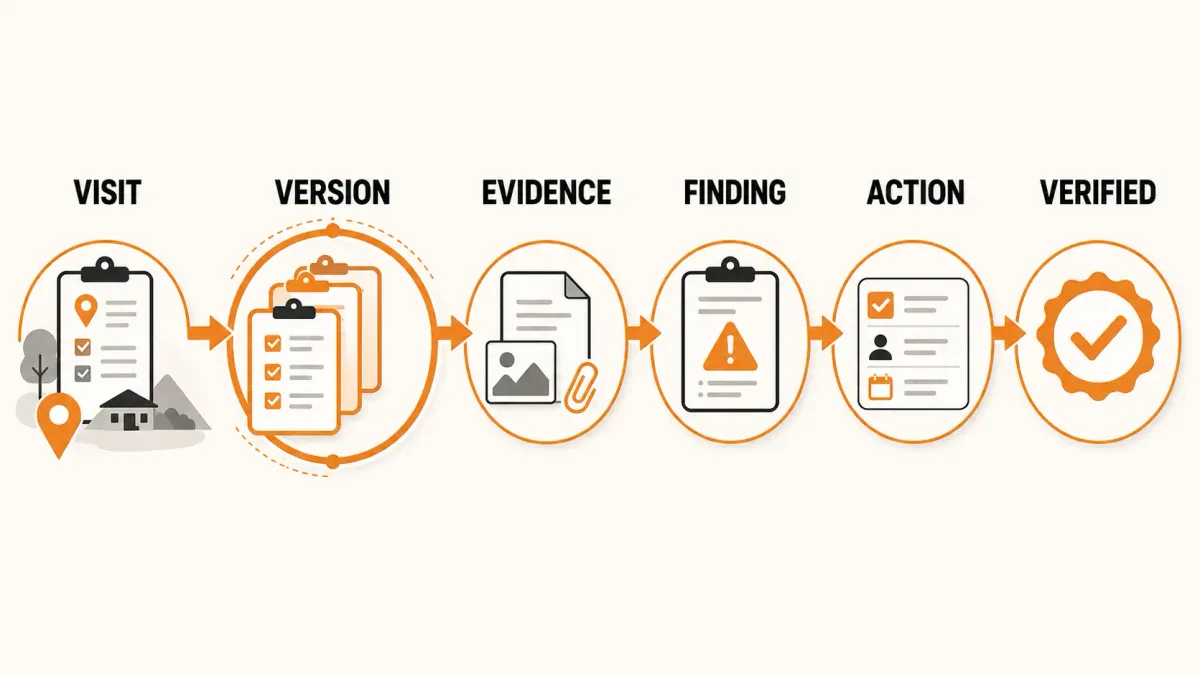
A useful model is:
Visit → Version → Evidence → Finding → Corrective Action → Verification → Closure
This is fundamentally different from simply storing the latest version of a monitoring form.
The objective is not to prevent legitimate corrections.
The objective is to ensure that important changes remain traceable.
What Is an Auditable Field Visit?
An auditable field visit is a monitoring or supervision visit whose history can be reconstructed from reliable records.
At minimum, an organization should be able to determine:
- when the visit was created;
- which project and site it concerned;
- who conducted the visit;
- what was assessed;
- what information was originally submitted;
- what evidence was collected;
- what findings were identified;
- what changed during review;
- what corrective actions were created;
- who was responsible;
- when actions were due;
- what evidence was provided in response;
- who reviewed the response;
- and whether the issue was ultimately resolved.
This creates an audit trail rather than simply a database record.
The distinction is important.
A database might tell you:
"The visit currently contains 27 responses."
An audit trail should help answer:
"What did the monitor originally submit, what changed during review, what findings resulted, and what happened afterward?"
Why an Audit Trail Matters in Field Monitoring
Monitoring creates decisions.
A field officer may identify a compliance gap.
A supervisor may review the finding.
A program manager may assign a corrective action.
A responsible officer may submit evidence.
An M&E manager may verify the evidence.
If the organization only retains the final state, it may lose the history of how those decisions were made.
That creates problems when:
- a donor asks for supporting evidence;
- management questions a finding;
- an auditor reviews a program;
- a disputed result needs investigation;
- a previous visit needs to be reconstructed;
- a staff member leaves the organization;
- or a recurring problem needs to be investigated.
An audit trail provides continuity.
It helps turn field monitoring from a collection of isolated reports into a traceable operational process.
A Field Visit Should Have a History, Not Just a Status
Consider a monitoring visit that currently says:
Status: Approved
That tells you where the visit is now.
It does not necessarily tell you how it got there.
An auditable workflow should preserve important events such as:
Visit Created → Data Captured → Submitted → Reviewed → Returned for Correction → Corrected → Resubmitted → Approved
The exact workflow will vary by organization.
The principle is the same:
Important operational changes should not silently overwrite history.
The Difference Between Version History and an Audit Trail
These concepts are related but not identical.
Version History
Version history answers:
What did the record look like at different points in time?
For example:
Version 1: The monitor submits the original visit.
Version 2: A correction is made to a response.
Version 3: The visit is reviewed and updated.
Version 4: The final approved version is preserved.
This allows the organization to reconstruct previous states.
Audit Trail
An audit trail answers:
What happened to the record, who performed the action, and when did it happen?
For example:
| Event | Actor | Time |
|---|---|---|
| Visit created | M&E Officer | 09:12 |
| Visit submitted | M&E Officer | 15:43 |
| Visit reviewed | M&E Manager | 10:06 |
| Returned for correction | M&E Manager | 10:11 |
| Corrected | M&E Officer | 14:27 |
| Approved | M&E Manager | 16:02 |
A strong monitoring system benefits from both.
Version history preserves the state of the information.
The audit trail preserves the history of the activity.
Why Overwriting Monitoring Records Is Risky
Suppose a monitoring officer records:
"Monthly reports were not submitted on time."
A supervisor later reviews the visit and the wording is changed to:
"Monthly reports were submitted with minor delays."
If the system only stores the final version, the original observation has disappeared.
That may be harmless if the change was a legitimate correction.
But from an accountability perspective, the organization should be able to distinguish:
- what was originally reported;
- what was subsequently changed;
- and what the final approved record became.
The goal of version history is therefore not to prevent editing.
It is to make editing traceable.
What Should Be Preserved When a Visit Changes?
An auditable system should consider preserving important components of the visit, including:
Visit Metadata
- project;
- site;
- visit date;
- visit type;
- monitor;
- status.
Monitoring Responses
- questions;
- responses;
- scores;
- observations;
- notes.
Monitoring Template
The structure of the monitoring tool used at the time of the visit.
Evidence
- photographs;
- documents;
- attachments;
- supporting files;
- other relevant media.
Findings
- finding description;
- category;
- severity;
- status.
Corrective Actions
- action;
- owner;
- due date;
- priority;
- status.
Review History
- submission;
- review;
- rejection;
- correction;
- approval.
This creates a much more complete historical record than storing only the latest form response.
Preserve the Monitoring Template Used at the Time
This is an important but frequently overlooked part of auditability.
Imagine an organization monitors a project for three years.
In Year 1, the monitoring template contains 40 questions.
In Year 2, the organization adds 12 new questions.
In Year 3, the organization removes 8 questions.
Now someone looks at a Year 1 visit and asks:
"What exactly was the monitor expected to assess at that time?"
If the historical visit simply references the organization's current template, the answer may become unclear.
A stronger approach is to preserve the structure of the monitoring instrument used when the visit was captured.
That allows historical visits to remain interpretable even after monitoring tools evolve.
Preserve Evidence With the Visit
A finding is stronger when its supporting evidence can be traced.
For example:
Finding: Facility stock records do not reconcile with the reported stock balance.
The evidence might include:
- stock register;
- inventory record;
- photograph;
- document;
- observation;
- or other supporting material.
The important principle is:
Evidence should remain connected to the finding and the visit that produced it.
Otherwise, organizations can end up with folders full of photographs and documents that are difficult to connect to specific monitoring observations.
Evidence Should Support Findings
A useful finding should make the relationship between the expected condition and the observed condition clear.
Expected
All controlled medicines should be recorded in the facility stock register.
Evidence Reviewed
Facility stock register and physical stock count.
Observed
Three sampled medicines had balances that did not match the register.
Finding
The facility's stock records are not consistently reconciled with physical stock.
Risk
Inaccurate stock information may affect procurement and availability decisions.
This is more useful than simply recording:
"Stock management problem."
From Finding to Corrective Action
The next step is to convert the finding into a specific action when action is required.
Finding
Three medicine balances could not be reconciled with the stock register.
Corrective Action
Reconcile the stock register with the physical inventory and implement a monthly reconciliation procedure.
Owner
Facility Manager.
Due Date
30 September.
Priority
High.
This creates a traceable relationship:
Finding → Action
A monitoring finding without follow-up may document a problem without creating accountability for resolving it.
A Corrective Action Should Be Testable
Avoid actions such as:
"Improve documentation."
That is difficult to measure.
A better action is:
"Reconcile the beneficiary register against the monthly report and submit the approved reconciliation to the Project Manager by 30 September."
The second action identifies:
- what must be done;
- who needs to do it;
- what evidence should exist;
- and when it should be completed.
This makes follow-up possible.
Assign an Owner
Every corrective action should have a responsible owner.
Possible owners include:
- Site Manager;
- Program Officer;
- Project Manager;
- Data Officer;
- Partner Organization;
- Facility Manager;
- M&E Officer.
The owner does not necessarily have to perform every task personally.
The important thing is that accountability is explicit.
Without ownership, a finding can remain documented without becoming actionable.
Add a Due Date
A corrective action without a deadline is difficult to prioritize.
Consider:
"Replace damaged equipment."
Now compare:
"Replace the damaged cold-chain equipment by 30 September and provide installation evidence."
The second creates a measurable expectation.
A system can then distinguish between:
- Open;
- In Progress;
- Overdue;
- Submitted for Verification;
- Verified;
- Closed.
Completion Is Not the Same as Verification
This is one of the most important concepts in corrective-action management.
Suppose the responsible person marks:
Action: Completed
That tells the organization that the owner considers the work complete.
It does not necessarily prove that the underlying problem has been resolved.
For example:
Finding
Staff are not consistently following the required reporting procedure.
Corrective Action
Conduct refresher training.
Status
Completed.
The organization may still need to determine:
Did reporting improve after the training?
Verification could involve:
- reviewing subsequent reports;
- conducting a follow-up visit;
- checking new records;
- reviewing supporting documentation;
- or observing the process again.
This is the difference between completion and effectiveness.
Verification Closes the Accountability Loop
A strong workflow looks like this:
Finding → Corrective Action → Owner → Due Date → Evidence Submitted → Verification → Resolved
The final step is important.
Without verification, the organization may know that someone performed an activity.
With verification, the organization can determine whether the required response was adequately addressed.
Keep Unresolved Findings Visible
An old monitoring visit should not make unresolved issues disappear.
Imagine:
Visit: January
Finding: Missing financial documentation
Action: Reconcile records
Due: February
Status: Overdue
By April, the January visit may be archived.
But the corrective action should not disappear with it.
The organization still needs to know:
"This issue remains unresolved."
A good operational system therefore separates the age of the visit from the status of the resulting action.
Preserve the Relationship Between Visits and Findings
A finding should remain linked to the visit where it was identified.
For example:
Project: Community Health Program
Site: Kibera Community Health Centre
Visit: 15 September 2026
Finding: Incomplete reporting documentation
Action: Implement monthly reconciliation
Follow-up: 20 October 2026
Verification: Resolved
This relationship creates an auditable chain.
Carry Findings Into Future Visits
A subsequent monitoring visit should not necessarily begin with a blank slate.
Suppose Site A had the same finding during:
Visit 1 → Visit 2 → Visit 3
That is not simply three independent findings.
It may indicate a recurring operational problem.
The next visit should therefore be able to show the monitor:
- previous findings;
- previous actions;
- current action status;
- verification history;
- and relevant evidence.
This gives the monitoring team context before arriving at the site.
An Audit Trail Creates Institutional Memory
M&E teams change.
Program managers change.
Project staff leave.
Implementing partners change.
When that happens, organizations can lose contextual knowledge.
A structured audit trail reduces that risk.
Instead of asking:
"Who remembers what happened at this site?"
the organization can ask:
"What does the monitoring history show?"
That is especially valuable for programs that operate over several years.
Auditability Is Not the Same as Surveillance
An audit trail should not exist primarily to monitor employees.
Its purpose is to protect the integrity and continuity of operational records.
The important questions are:
- Was the record changed?
- What changed?
- When?
- By whom?
- What was the previous state?
- Why did the workflow move forward or backward?
- What evidence supports the resulting finding?
- What action was taken?
- Was the action verified?
The audit trail should support accountability, transparency, and operational continuity.
An Auditable Field Visit Model
A practical model is:
FIELD VISIT → VISIT HISTORY → EVIDENCE → FINDINGS → CORRECTIVE ACTIONS → VERIFICATION → CLOSURE
The important point is that these should be connected records, not unrelated files.
What Should an Audit Trail Answer?
A useful test is to ask whether your system can answer these questions.
About the Visit
- Who created it?
- Which project did it belong to?
- Which site was visited?
- When did the visit occur?
- Who conducted it?
About the Information
- What was originally submitted?
- What was changed?
- What version was approved?
- Which monitoring template was used?
About Evidence
- What evidence supported the finding?
- Is the evidence still available?
- Can it be connected to the relevant visit or finding?
About Findings
- What was found?
- How serious was it?
- Who reviewed the finding?
About Corrective Actions
- What action was required?
- Who owns it?
- When was it due?
- What is its current status?
About Verification
- What evidence was submitted?
- Who verified it?
- When was it verified?
- Was the finding actually resolved?
If the answer to these questions requires searching through email, spreadsheets, and folders, the organization does not yet have a complete operational audit trail.
Common Mistakes That Weaken Field-Visit Auditability
1. Overwriting the Original Record
The latest version replaces the original.
Better: Preserve historical versions.
2. Keeping Evidence Separately
Photos and documents are stored in unrelated folders.
Better: Keep evidence connected to the visit or finding it supports.
3. Recording Findings Without Actions
The monitoring report identifies the problem but nobody tracks the response.
Better: Link findings to corrective actions where action is required.
4. Assigning Actions Without Owners
The organization knows what needs to happen but not who is accountable.
Better: Assign every action to a responsible person or role.
5. Marking Actions Complete Without Verification
The responsible person reports completion and the issue disappears.
Better: Define an appropriate verification step.
6. Losing Historical Template Context
A monitoring tool changes and old visits are interpreted using the new structure.
Better: Preserve the monitoring template version associated with each historical visit.
7. Treating the Final Report as the Complete Audit Trail
The final PDF is stored, but the workflow that produced it is lost.
Better: Preserve the underlying operational history.
How FieldOps Makes Field Visits Auditable
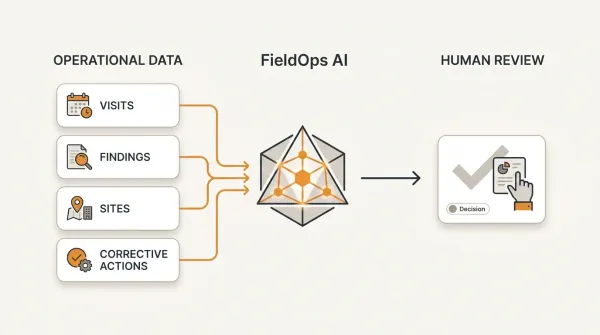
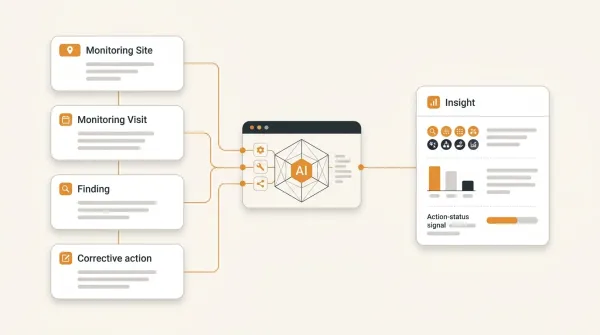
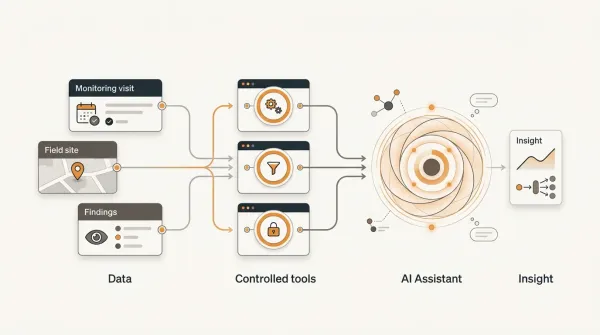
FieldOps is designed around a connected operational model:
Organization → Program → Project → Site → Visit → Finding → Corrective Action
The platform combines field visit workflows with version history, snapshots, audit trails, findings, and corrective actions.
For visits, FieldOps supports a controlled workflow through stages such as:
Draft → Submitted → Reviewed → Approved
with correction and rejection where required.
More importantly for auditability, FieldOps preserves historical versions of visits rather than simply overwriting operational records.
Visit snapshots preserve historical states, while associated media and evidence can remain connected to the historical visit context.
FieldOps also preserves the monitoring-template structure associated with historical visits, helping records remain interpretable when monitoring tools evolve.
FieldOps Connects Findings to Corrective Actions
A field visit should not end with:
"Three findings identified."
FieldOps allows findings to become trackable corrective actions with:
- owners;
- due dates;
- priorities;
- statuses;
- and completion evidence.
That creates a connected operational chain:
Visit → Finding → Corrective Action → Owner → Due Date → Evidence → Resolution
The result is more than a monitoring database.
It is a traceable workflow for managing what happens after monitoring.
FieldOps Preserves Operational History
An important distinction is between storing a current record and preserving operational history.
FieldOps provides a structure for preserving:
- visit version history;
- visit snapshots;
- historical media;
- monitoring-template snapshots;
- audit activity;
- workflow history;
- and previous versions when restoration is required.
This means an organization can maintain a historical record of how important operational information changed rather than relying exclusively on the latest state.
FieldOps Can Work With Existing Data-Collection Systems
Auditability does not require an organization to abandon its existing data-collection tools.
FieldOps can complement data collection from systems such as:
- KoboToolbox;
- ODK Central;
- Excel;
- and other operational data sources.
The important distinction is:
Data collection collects information.
Operational monitoring manages what happens around that information.
For organizations already using digital data-collection tools, an operational monitoring layer can provide the workflow needed to move from collected information to visits, findings, corrective actions, and follow-up.
A Practical Example
Consider a program monitoring 100 health facilities.
A monitoring officer visits Facility A.
The visit records:
Visit date: 15 September
Monitor: M&E Officer
Findings: 4
Evidence: 7 files and photographs
One finding identifies a stock-record discrepancy.
The organization creates:
Corrective action: Reconcile stock records.
Owner: Facility Manager.
Priority: High.
Due date: 30 September.
The facility later submits evidence.
The M&E team reviews it.
The action is verified.
The action is closed.
Three months later, the facility is visited again.
The new monitoring visit can be considered alongside:
- the previous visit;
- the previous finding;
- the corrective action;
- the evidence;
- and the verification history.
If the same problem appears again, the organization now has evidence of recurrence.
That is much more valuable than simply having two disconnected monitoring reports.
Auditability Enables Better Management Questions
Once visits, versions, findings, and actions are connected, organizations can ask questions such as:
- Which sites have unresolved high-priority findings?
- Which findings have been repeatedly identified?
- Which actions are overdue?
- Which projects have the highest number of open findings?
- Which sites have not been monitored recently?
- Which findings were resolved after follow-up?
- Which corrective actions repeatedly fail verification?
- Which problems are appearing across multiple projects?
- What changed between the original visit and the approved version?
- Which monitoring visits were rejected and resubmitted?
These questions move the organization beyond document storage.
They create operational intelligence.
A Simple Auditability Checklist
Before calling a field monitoring system auditable, ask:
Visit Identity
- Is every visit linked to a project and site?
- Is the monitor recorded?
- Is the visit date preserved?
- Is the visit purpose documented?
Version Control
- Is the original submission preserved?
- Are important historical versions available?
- Can the organization reconstruct previous states?
Template Integrity
- Is the monitoring structure used during the visit preserved?
- Can historical visits be interpreted after templates change?
Evidence
- Is evidence linked to the relevant visit?
- Is evidence linked to findings where appropriate?
- Is historical evidence preserved?
Findings
- Are findings linked to their source visit?
- Are findings categorized consistently?
- Can recurring findings be identified?
Corrective Actions
- Is every required action recorded?
- Does every action have an owner?
- Does every action have a deadline?
- Can status changes be tracked?
Verification
- Is completion evidence preserved?
- Is verification recorded?
- Can the organization determine whether an action was actually resolved?
Audit History
- Can the organization determine who changed important records?
- Can it determine when changes occurred?
- Can it distinguish historical versions from the current state?
If the answer is yes across these areas, the organization has the foundations of an auditable field-monitoring process.
The Most Important Principle
An audit trail is not valuable simply because it records technical events.
Its value comes from preserving the meaningful operational history of a program.
For field monitoring, that history is:
What did we plan to monitor?
↓
What did we actually observe?
↓
What evidence supports the observation?
↓
What did we find?
↓
What action did we require?
↓
Who was responsible?
↓
What changed?
↓
What evidence demonstrated completion?
↓
Who verified it?
↓
Was the problem actually resolved?
That is the chain an organization should be able to reconstruct.
Conclusion
A field visit becomes auditable when the organization can reconstruct its history rather than seeing only its latest state.
That means preserving:
The visit
The monitoring template
The submitted information
The versions
The evidence
The findings
The corrective actions
The ownership
The deadlines
The verification
The closure
The most useful model is:
Visit → Version → Evidence → Finding → Corrective Action → Verification → Closure
This approach creates accountability without preventing legitimate corrections.
It also creates something equally valuable: institutional memory.
When staff change, projects evolve, and monitoring tools are updated, the organization can still understand what happened at a site, what was found, what changed, and how the issue was handled.
For development programs managing many projects and sites, that distinction matters.
A digital form can tell you what someone entered.
A complete operational system should also help you answer:
What happened next?
Move beyond data collection
FieldOps helps NGOs manage field visits, monitoring templates, findings, corrective actions, dashboards and donor reporting in one operational intelligence platform.
Learn more about FieldOps