How to Manage Monitoring When Data Comes From Multiple Systems
Learn how NGOs and development organizations can manage monitoring when data is spread across KoboToolbox, ODK, DHIS2, Excel, and other systems without replacing the tools they already use.
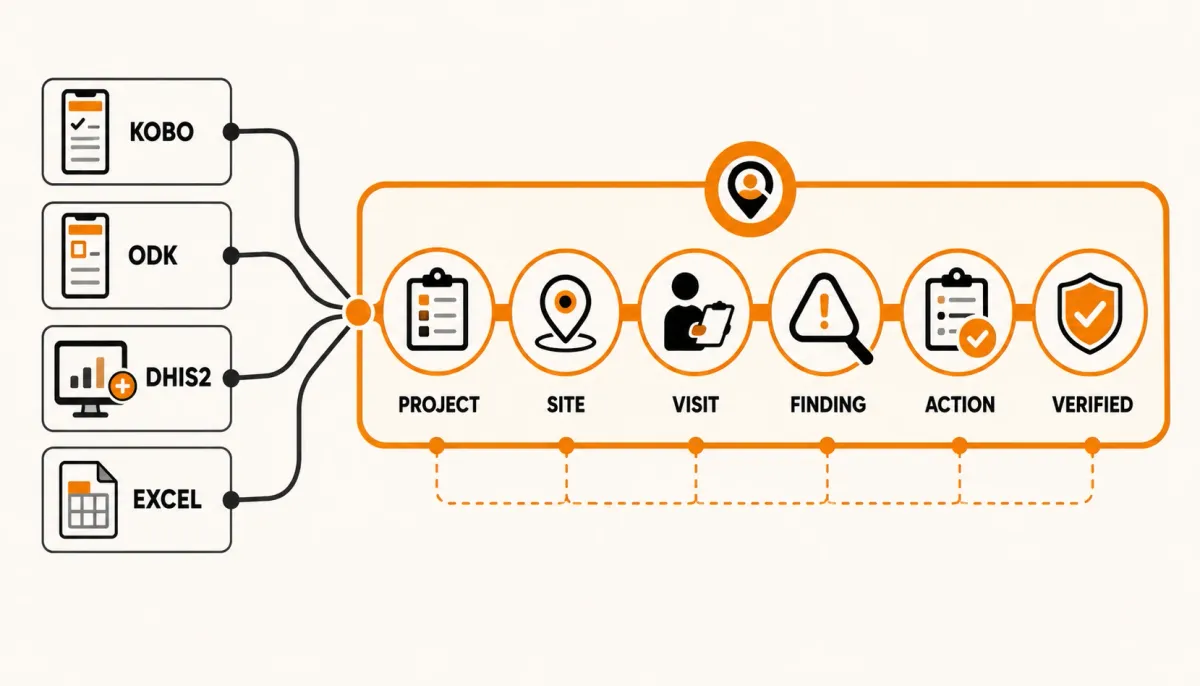
Many organizations do not have a single system for monitoring.
A health program may use DHIS2 for routine health information, KoboToolbox for surveys and assessments, ODK for field data collection, Excel for operational tracking, and shared folders for photographs and supporting documents.
Each system may be doing its job well.
The difficulty begins when managers need to answer questions that cross those systems:
- Which project does this information belong to?
- Which site was monitored?
- When was the site last visited?
- What findings were identified?
- Which corrective actions are still open?
- Who is responsible for resolving them?
- Was the problem verified during a subsequent visit?
- Which sites require management attention?
This is not simply a data-collection problem.
It is an operational monitoring problem.
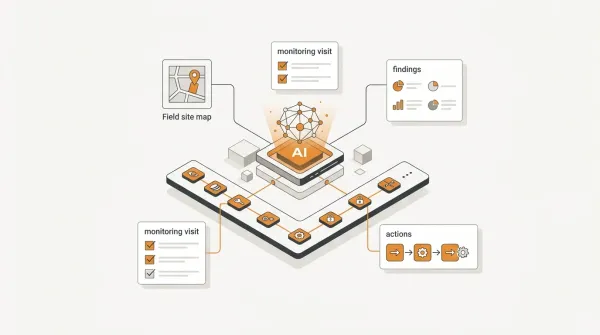
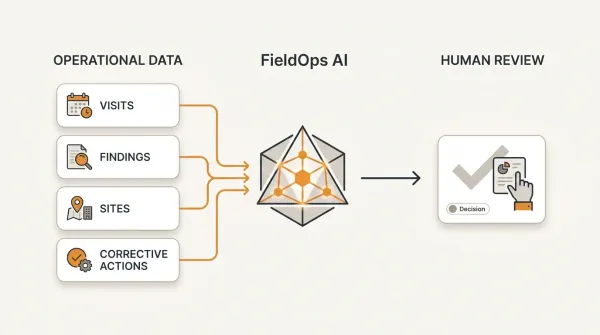
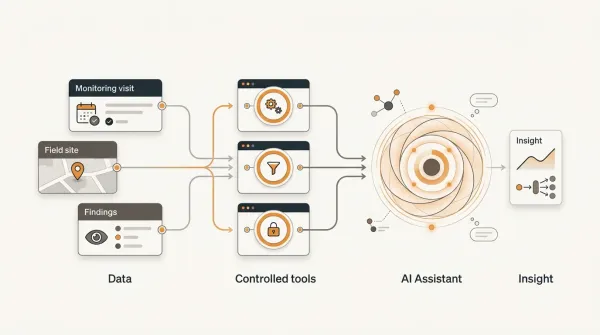
A practical solution is not necessarily to replace every existing system. Instead, organizations can establish a structured operational monitoring layer that connects data sources with projects, sites, field visits, findings, corrective actions, verification, and performance management.
Why Organizations End Up With Multiple Monitoring Systems
Different systems are often introduced for legitimate reasons.
One system may be selected because it is excellent for mobile data collection.
Another may already be the organization's national or sector information system.
A third may be used by a technical team for analysis.
Excel may remain useful for planning, budgeting, or simple operational tracking.
Over time, the organization develops an ecosystem such as:
- KoboToolbox for surveys and assessments
- ODK for structured field data collection
- DHIS2 for health information and program data
- Excel for operational trackers
- Documents and photographs for supporting evidence
The existence of multiple systems is not automatically a problem.
The problem is when the organization cannot maintain the relationships between the information stored in those systems.
The Difference Between Data Collection and Operational Monitoring
A data-collection system answers questions such as:
What information did the field officer collect?
Operational monitoring asks additional questions:
What project does this relate to?
Which site does it concern?
What did the organization find?
What action was required?
Who owns that action?
When is it due?
Was the action completed?
Was completion verified?
These questions require workflow and context, not just data storage.
The Problem With Treating Every System as the Same Thing
KoboToolbox, ODK, DHIS2, Excel, and other platforms have different purposes.
Trying to force one system to perform every function can create unnecessary complexity.
A mobile data-collection platform may be excellent at collecting structured submissions.
A health information system may be excellent at managing health indicators.
A spreadsheet may be convenient for a small operational list.
A monitoring operations platform may be better suited to managing the lifecycle of field visits, findings, corrective actions, and follow-up.
The better question is therefore not:
Which system should replace all the others?
It is:
How should the systems work together?
Start With the Monitoring Workflow
Before integrating systems, define the operational workflow.
A typical project monitoring workflow might look like:
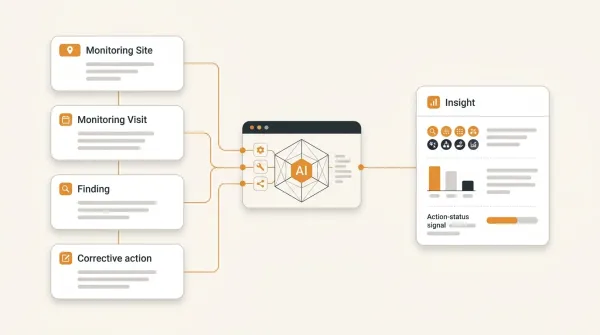
Project → Site → Monitoring Visit → Observations → Findings → Corrective Actions → Evidence → Verification → Resolution
This provides the operational structure into which information from different systems can be connected.
Establish a Common Operational Hierarchy
One of the most important steps is establishing consistent organizational context.
For example:
Organization → Program → Project → Site → Visit
This hierarchy provides a common reference point.
A Kobo submission, ODK submission, or DHIS2 record may contain useful data, but management still needs to know how that information relates to the organization's operational structure.
For example:
Project: Maternal Health Improvement Program
Site: Facility 017
Monitoring Visit: 14 August 2026
Finding: Stock records incomplete
Corrective Action: Update stock documentation
The operational hierarchy turns isolated information into monitoring context.
Use Stable Site Identifiers
Multiple systems become much easier to manage when sites have stable identifiers.
For example:
- SITE-001
- SITE-002
- SITE-003
The same identifier can be mapped across systems.
A DHIS2 organization unit, Kobo submission, ODK record, and FieldOps site can then be related to the same operational location where appropriate.
Without stable identifiers, organizations often resort to matching names manually.
That creates problems when one system calls a site:
Kapsabet Health Centre
while another uses:
Kapsabet HC
and another uses:
Kapsabet Health Center Level 3
A stable identifier is more reliable than attempting to match names.
Do Not Start With Integration Technology
Organizations often begin by asking:
How do we integrate Kobo with DHIS2?
or:
How do we connect ODK to our dashboard?
Those may be useful technical questions.
But they should come after a more fundamental question:
What operational process are we trying to support?
For example, if the goal is to monitor project sites, the workflow might be:
Data Source → Project / Site → Monitoring Visit → Finding → Corrective Action → Verification
The integration should support that workflow.
Otherwise, an organization can successfully move data between systems without actually improving monitoring.
Separate Systems of Record From Operational Workflow
A useful architecture distinguishes between the systems that hold source data and the system that manages the operational workflow.
Data Sources
KoboToolbox
Collection and submission data.
ODK
Field data and structured submissions.
DHIS2
Health information and program data.
Excel
Operational datasets and supporting information.
Operational Monitoring Layer
Projects
Sites
Visits
Findings
Corrective Actions
Verification
This approach does not require every source system to become an operational case-management system.
What Should Be Centralized?
Not everything needs to be copied into one platform.
The information that should be centralized depends on the organization's workflow.
For field monitoring, useful shared context includes:
- project
- site
- monitoring visit
- monitoring status
- findings
- finding severity
- corrective actions
- action owner
- due date
- evidence
- verification
- resolution status
The objective is to create a reliable operational view.
What Should Remain in the Source System?
Organizations should avoid unnecessary duplication.
The source system may remain responsible for:
- original survey submissions
- detailed health information
- raw data
- specialized datasets
- indicator calculations
- or other information for which it is the authoritative system
The operational layer can reference or synchronize the information needed for monitoring workflows.
This creates a more sustainable architecture than attempting to duplicate every field from every system.
Example: KoboToolbox and Operational Monitoring
Consider an NGO conducting a quarterly facility assessment using KoboToolbox.
Kobo collects:
- facility information
- assessment responses
- observations
- photographs
- other survey data
The collection process works well.
But after the assessment, the M&E Manager asks:
Which facilities failed the assessment?
What findings were identified?
Who needs to address them?
When are the actions due?
Which facilities have unresolved findings?
Were the corrective actions verified?
The answers require more than the original submission.
The operational workflow could therefore become:
KoboToolbox → Project / Site Mapping → Monitoring Visit → Findings → Corrective Actions → Verification
The collection system continues doing what it does well.
The monitoring workflow gains the operational layer it needs.
Example: ODK and Field Monitoring
An organization may use ODK to collect field inspection data.
The ODK form can capture detailed observations during the inspection.
After submission, however, the organization may need to manage:
- review
- approval
- findings
- action owners
- deadlines
- follow-up visits
- resolution
The operational monitoring process therefore extends beyond the submission.
A useful model is:
ODK → Field Data → Operational Visit → Review → Finding → Action → Verification
This allows ODK to remain part of the collection workflow without requiring it to manage the entire operational lifecycle.
Example: DHIS2 and Field Monitoring
Health organizations often have DHIS2 data that provides important information about facilities and program performance.
But a performance indicator may raise a question rather than answer it.
For example:
Why did Facility 017 report a significant decline in a particular indicator?
Management may need a field visit to investigate.
The resulting workflow could be:
DHIS2 Indicator → Site Requires Attention → Monitoring Visit → Observation → Finding → Corrective Action → Follow-Up
The health information system provides the program information.
The field monitoring workflow provides a mechanism for investigating and acting on what that information reveals.
Example: Excel and Monitoring Operations
Excel remains useful for many organizations.
A spreadsheet may contain:
| Site | Finding | Owner | Due Date | Status |
|---|---|---|---|---|
| Site 001 | Missing records | Site Manager | 20 Aug | Open |
| Site 002 | Stock documentation gap | Facility Lead | 25 Aug | Open |
| Site 003 | Resolved documentation issue | Project Officer | 18 Aug | Closed |
For a small number of findings, this may work.
As the number of projects, sites, visits, findings, users, and actions increases, organizations often need stronger relationships and workflow controls.
For example:
- Which visit produced this finding?
- What evidence supports it?
- Was it reviewed?
- Was it verified?
- Has the site had the same finding before?
- Which other sites have the same issue?
Those questions are difficult to answer reliably when operational relationships are maintained manually across spreadsheets.
The Problem With Separate Corrective-Action Trackers
A common pattern is:
Monitoring system → Findings → Excel → Corrective-action tracker
The problem is that the corrective-action tracker can become detached from the monitoring record.
Someone may see:
Missing documentation — Open
But not immediately see:
- which project
- which site
- which visit
- who identified it
- what evidence was collected
- why it was classified as significant
- what happened during follow-up
A better operational model maintains the relationship:
Visit → Finding → Corrective Action → Verification
The Same Finding Can Reappear
Multiple systems also make recurring problems difficult to identify.
Suppose three monitoring visits report:
January
Stock records incomplete.
April
Stock records incomplete.
July
Stock records incomplete.
If each visit is stored independently, the organization may treat these as three unrelated observations.
Operationally, they may represent one recurring problem.
A monitoring system should make it possible to ask:
Has this site had the same or similar finding before?
and:
Has the corrective action actually resolved the underlying problem?
This is where historical monitoring data becomes more valuable than isolated submissions.
Build Around Events, Not Just Records
Operational monitoring is often easier to understand as a sequence of events:
Visit occurred → Finding identified → Action assigned → Evidence submitted → Action verified → Finding resolved
Each event has context.
The organization can therefore reconstruct what happened rather than simply viewing a collection of disconnected records.
Maintain an Audit Trail
When multiple systems are involved, traceability becomes particularly important.
Organizations should be able to determine:
- where information originated
- when it entered the monitoring workflow
- who reviewed it
- what changed
- who approved it
- what action was assigned
- what happened afterward
This becomes especially important for monitoring records used in:
- donor reporting
- compliance
- quality assurance
- program management
- audits
- organizational learning
Avoid Creating a Giant Duplicate Database
A multi-system monitoring strategy should not mean:
Copy everything from every system into one enormous database.
That creates unnecessary complexity.
Instead, identify the information required for the operational workflow.
Source systems remain authoritative for their specialized datasets.
The operational monitoring layer maintains the relationships required to manage:
Project → Site → Visit → Finding → Action → Verification
This keeps the architecture focused on what management actually needs.
Create Clear Data Ownership
Every important piece of information should have an accountable source.
For example:
| Information | Possible authoritative source |
|---|---|
| Health indicator | DHIS2 |
| Survey submission | KoboToolbox |
| Field inspection submission | ODK |
| Project structure | Monitoring platform |
| Site monitoring visit | Monitoring platform |
| Finding | Monitoring platform |
| Corrective action | Monitoring platform |
| Verification result | Monitoring platform |
The exact arrangement will differ by organization.
The principle is:
Know which system owns which information.
This reduces duplication and conflicting versions of the truth.
Create a Common Monitoring Vocabulary
Multiple systems can use different terminology.
One system may use:
Facility
Another:
Site
Another:
Organisation Unit
Another:
Location
The organization should establish a common operational vocabulary.
For example:
Site
is the operational location used by the monitoring workflow.
Individual source-system identifiers can then be mapped to that site.
The same principle applies to:
- projects
- programs
- indicators
- findings
- actions
- statuses
- reporting periods
Use Integration to Support Decisions, Not Just Data Movement
A technically successful integration is not necessarily a successful monitoring system.
Moving 10,000 records from one database to another does not automatically improve program management.
The integration becomes valuable when it helps answer questions such as:
Which sites require attention?
Which findings are overdue?
Which problems are recurring?
Which corrective actions have been verified?
Which projects have the greatest concentration of unresolved issues?
What changed after follow-up?
The objective should therefore be decision support and operational control, not simply synchronization.
A Practical Architecture for Multi-System Monitoring
A useful architecture is:
DATA SOURCES
KoboToolbox | ODK | DHIS2 | Excel
↓
DATA MAPPING
↓
OPERATIONAL CONTEXT
Project → Site → Visit
↓
FINDINGS
↓
CORRECTIVE ACTIONS
↓
VERIFICATION
↓
PERFORMANCE
The source systems continue serving their respective purposes.
The operational monitoring layer provides the shared workflow.
How FieldOps Fits Into a Multi-System Environment
FieldOps is designed around the operational monitoring layer rather than requiring organizations to abandon every existing data system.
It provides a structure for managing:
Organization → Program → Project → Site → Visit
and connecting monitoring visits to:
Findings → Corrective Actions → Verification → Performance
FieldOps can also work with data originating from systems such as KoboToolbox and ODK Central, allowing organizations to retain their existing data-collection workflows while adding structured operational monitoring.
The objective is not to make every organization use one tool for everything.
The objective is to provide a reliable operational workflow around the information organizations already collect.
A Practical Example of the Complete Flow
Imagine a development organization operating 60 project sites.
Its technology environment includes:
- KoboToolbox for beneficiary surveys
- ODK for field inspections
- DHIS2 for health indicators
- Excel for selected operational trackers
A site begins showing poor performance in DHIS2.
The project team identifies the site for follow-up.
A monitoring visit is created.
The field officer conducts the visit and records observations.
The visit is submitted.
A reviewer checks the record.
A finding is identified:
Required documentation is incomplete.
A corrective action is assigned:
Complete the missing documentation and submit evidence.
The action has an owner and due date.
The site later submits evidence.
The M&E team verifies the evidence.
The finding is marked resolved.
The operational chain is now:
DHIS2 Signal → Site → Monitoring Visit → Finding → Corrective Action → Evidence → Verification
The original systems remain useful.
But management now has a connected operational workflow.
When Should an Organization Consider an Operational Monitoring Layer?
A dedicated operational monitoring layer becomes increasingly valuable when an organization experiences several of these conditions:
- multiple data-collection platforms
- many projects
- many sites
- multiple monitoring teams
- repeated field visits
- large numbers of findings
- corrective actions tracked manually
- difficulty identifying overdue actions
- inconsistent monitoring workflows
- limited visibility into historical visits
- difficulty determining whether problems recur
- difficulty tracing findings back to their original field evidence
The exact threshold differs between organizations.
The important signal is not simply the number of systems.
It is the complexity of the workflow between data collection and action.
A Checklist for Managing Multiple Monitoring Systems
Before implementing or redesigning a multi-system monitoring environment, ask:
1. What does each system do?
Document the primary purpose of every platform.
2. Which system owns each type of data?
Avoid ambiguous ownership.
3. Do all systems use consistent identifiers?
Especially for projects and sites.
4. What is the operational monitoring workflow?
Define it before designing integrations.
5. Where are monitoring visits managed?
Do not assume the data-collection system should automatically own the entire workflow.
6. Where are findings managed?
Ensure findings remain connected to their source visits.
7. Where are corrective actions managed?
Define ownership, due dates, evidence and status.
8. How are actions verified?
Completion should not automatically mean resolution.
9. Can historical monitoring records be reconstructed?
Preserve important versions and audit information.
10. Can management identify recurring problems?
Historical relationships should support analysis across visits and sites.
11. Can management identify sites requiring attention?
Operational information should support prioritization.
12. Are integrations supporting decisions?
Measure success by improved monitoring and follow-up, not merely by successful data transfers.
The Most Important Principle
Organizations do not necessarily need to consolidate every piece of data into one system.
They need to connect the information required to manage their operations.
A strong multi-system monitoring architecture separates three concerns:
Data Collection
Collect information using the tools appropriate for the task.
Operational Monitoring
Connect information to projects, sites, visits, findings and corrective actions.
Management
Use the resulting operational information to prioritize attention, follow up on problems and understand performance.
This allows organizations to preserve the value of their existing systems while addressing the operational gaps between data collection and action.
Conclusion
Using multiple data systems is not inherently a weakness.
KoboToolbox, ODK, DHIS2, Excel, and other platforms can each serve important purposes.
The challenge arises when the organization needs to manage a workflow that crosses those systems.
The critical questions are no longer simply:
Was the data collected?
They become:
What does the data mean operationally?
Which project and site does it relate to?
Does it require a monitoring visit?
What finding resulted?
Who must act?
Has the action been completed?
Has it been verified?
What happened afterward?
A practical approach is therefore to keep specialized systems for the work they already perform well while establishing a structured operational monitoring layer around:
Project → Site → Visit → Finding → Corrective Action → Verification → Performance
That is the difference between having multiple sources of data and having a connected monitoring operation.
For organizations using KoboToolbox, ODK, DHIS2, Excel, or combinations of these tools, the goal should not be to eliminate every existing system.
The goal should be to ensure that data collected in the field can ultimately lead to a traceable monitoring decision and, where necessary, verified corrective action.
Collect where appropriate. Connect the operational context. Act on what the monitoring reveals.
Move beyond data collection
FieldOps helps NGOs manage field visits, monitoring templates, findings, corrective actions, dashboards and donor reporting in one operational intelligence platform.
Learn more about FieldOps