How to Track M&E Findings and Corrective Actions Without Excel
Learn why M&E findings disappear into reports and spreadsheets, how to build a proper corrective-action workflow, and how NGOs can track findings from identification to verified resolution.
A monitoring visit can identify an important problem.
A field officer records it.
The monitoring team reviews the data.
The finding appears in a report.
The report is sent to project management.
And then the real challenge begins:
Who is going to fix the problem?
Many organizations manage this stage using Excel spreadsheets, Word documents, email and messaging applications.
The monitoring team may maintain a spreadsheet containing:
- finding,
- site,
- responsible person,
- action,
- due date,
- status,
- and comments.
At first, this seems perfectly reasonable.
But as the number of projects, sites and monitoring visits increases, the findings tracker can become one of the most difficult parts of the M&E workflow to maintain.
Rows become outdated.
Responsible people change.
Due dates pass.
Actions are completed but not verified.
New findings are added from different monitoring visits.
The same issue appears repeatedly.
Different team members maintain different versions of the tracker.
Eventually, the organization has a large amount of monitoring information but still struggles to answer a simple question:
Which important findings are still unresolved?
This article explains how organizations can build a more reliable findings and corrective-action workflow without relying on a collection of disconnected spreadsheets.
What is an M&E finding?
An M&E finding is an observation or issue identified through monitoring, assessment, verification or review.
For example:
Essential medicines were unavailable at the facility during the monitoring visit.
Or:
Required beneficiary documentation was incomplete.
Or:
The project site had not received the planned training during the reporting period.
Or:
The monitoring team found that attendance records did not match the reported figures.
A finding is not simply a comment.
A useful finding should lead to a management decision.
That usually means asking:
- How serious is it?
- Why did it happen?
- What needs to be done?
- Who should do it?
- When should it be completed?
- How will completion be verified?
That is where corrective-action management begins.
A finding is not the same as an action
This distinction is important.
A finding describes a problem or observation.
An action describes what will be done in response.
For example:
Finding
The facility did not maintain the required stock records.
Action
The facility manager will update the stock records and introduce a weekly reconciliation process.
The finding and action are related, but they are not the same record.
A single finding may also require several actions.
For example:
Finding:
Three facilities have persistent stock-out problems.
Possible actions:
- Review procurement forecasting.
- Reconcile stock records.
- Investigate distribution delays.
- Verify stock availability during the next monitoring visit.
A proper M&E workflow should therefore allow findings and actions to have a relationship rather than forcing everything into one spreadsheet row.
Why the spreadsheet findings tracker becomes difficult
An Excel tracker often starts simply:
| Site | Finding | Action | Owner | Due date | Status |
|---|---|---|---|---|---|
| Site A | Missing records | Update records | Manager | Aug 10 | Open |
| Site B | Stock-out | Replenish stock | Facility lead | Aug 12 | Open |
| Site C | Low attendance | Investigate | Project officer | Aug 15 | Complete |
This works when there are a small number of findings.
But imagine the organization has:
- 5 programs,
- 20 projects,
- 200 sites,
- monthly monitoring,
- several findings per visit,
- and multiple actions per finding.
The tracker becomes increasingly difficult to manage.
The spreadsheet is now being asked to function as:
- a database,
- workflow system,
- notification system,
- accountability register,
- audit trail,
- reporting system,
- and historical monitoring record.
Excel was not designed specifically for this combination of responsibilities.
The biggest problem: findings lose their context
Suppose an Excel tracker contains:
Site A — stock-out — resolve — open.
Six months later, someone reviewing the spreadsheet may not know:
- Which project?
- Which monitoring visit?
- Which reporting period?
- Which indicator?
- What exactly was observed?
- How severe was the issue?
- Was evidence collected?
- Has the problem occurred before?
- Was the action actually verified?
A finding without context is difficult to manage.
A strong monitoring system should preserve the relationship:
Project → Site → Visit → Finding → Action → Verification
This creates an auditable chain from the original monitoring activity to the eventual resolution.
The correct lifecycle of a finding
A finding should have a defined lifecycle.
A simple workflow is:
Identified
↓
Reviewed
↓
Action assigned
↓
In progress
↓
Submitted for verification
↓
Verified
↓
Closed
Not every organization needs exactly these statuses.
The important principle is that the finding should move through a controlled process rather than simply changing a cell in a spreadsheet.
Why "Complete" is not necessarily "Resolved"
This is one of the most important distinctions in corrective-action management.
Imagine an action says:
Replace damaged equipment.
The responsible person changes the status to:
Complete
But has anyone verified that the equipment was actually replaced?
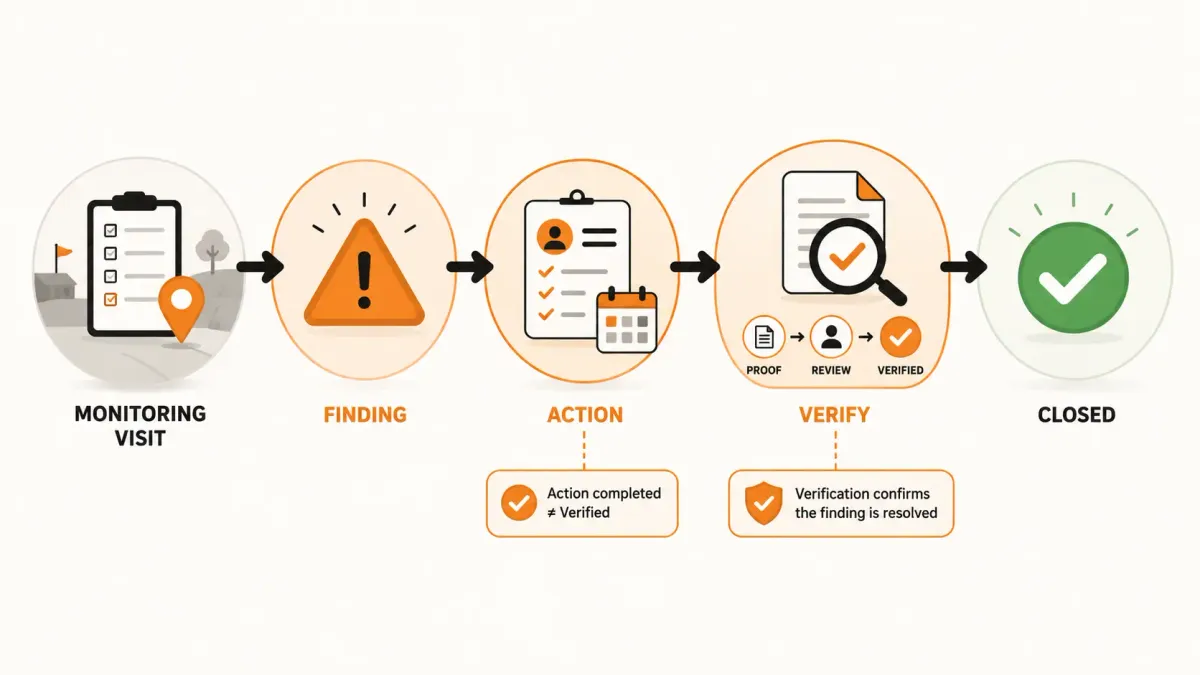
A stronger workflow separates:
Action completed
from
Action verified
The responsible person may provide evidence.
A supervisor or M&E officer can then verify it.
Only after verification should the finding be considered resolved.
This creates a much stronger chain of accountability:
Finding → Action → Evidence → Verification → Closure
Every finding should have an owner
A finding without an owner is unlikely to be resolved.
Consider:
"Improve data quality at the facility."
Who is responsible?
The facility manager?
The project officer?
The M&E officer?
The program manager?
A better finding record identifies an accountable person.
For example:
Finding: Incomplete beneficiary records.
Owner: Project Officer.
Action: Review and correct beneficiary records.
Due date: August 15.
Status: In progress.
Now the organization has accountability.
Every action should have a due date
An action without a deadline is usually an intention rather than a commitment.
Compare:
Improve stock management.
with:
Complete stock reconciliation and submit evidence by August 15.
The second statement is measurable.
It allows the monitoring team to determine whether the action is overdue.
That creates another useful operational status:
Due
Overdue
Completed
Verified
This is far more useful than a simple open/closed spreadsheet column.
Overdue actions require special attention
Imagine an organization has 300 open corrective actions.
That number alone does not tell management where to focus.
Suppose the breakdown is:
- 190 on schedule,
- 70 due soon,
- 30 overdue,
- 10 severely overdue.
The 10 severely overdue actions may require immediate attention.
A monitoring system should therefore make it easy to identify actions based on:
- due date,
- severity,
- project,
- site,
- responsible person,
- and status.
This allows management to move from:
"How many findings do we have?"
to:
"Which unresolved findings require intervention?"
Severity should influence prioritization
Not every finding has the same importance.
A useful classification might be:
Low
Minor issue that should be corrected through routine management.
Medium
Issue that could affect implementation or data quality if not addressed.
High
Issue requiring prompt corrective action.
Critical
Issue requiring immediate escalation.
The exact terminology should reflect the organization's own policies.
The important principle is that severity should influence workflow.
A critical finding should not be treated the same way as a minor administrative issue.
Findings should be connected to monitoring visits
A finding should have an origin.
For example:
Project: Maternal Health Program
Site: Facility 014
Visit: Quarterly Monitoring Visit — July 2026
Finding: Essential commodity stock-out
This matters because the organization may later ask:
When was this issue first identified?
or:
Was this issue already identified during the previous visit?
Without a relationship between the finding and the monitoring visit, answering these questions becomes difficult.
Recurring findings are a management signal
Suppose a facility receives the following finding:
January: Stock records incomplete.
April: Stock records incomplete.
July: Stock records incomplete.
October: Stock records incomplete.
A report may treat these as four findings.
An operational monitoring system should be able to reveal that they represent a recurring problem.
That changes the management conversation.
Instead of asking:
What did we find during the latest visit?
management can ask:
Why has this problem persisted for an entire year?
This may reveal:
- inadequate training,
- insufficient supervision,
- process failures,
- staffing problems,
- procurement issues,
- or unrealistic procedures.
Recurring findings can therefore become a source of program learning.
The difference between a finding tracker and an operational workflow
A spreadsheet can tell you:
There are 27 open findings.
An operational workflow can tell you:
There are 27 open findings, including 6 high-severity findings, 8 overdue actions, and 4 recurring issues across three projects.
The second answer is much more useful.
The difference is not simply the user interface.
It is the structure of the underlying information.
A useful data model
A practical findings model can look like this:
Project
Defines the intervention.
Site
Defines where implementation occurs.
Visit
Defines when monitoring occurred.
Finding
Defines what was observed.
Action
Defines what must be done.
Evidence
Documents what was done.
Verification
Confirms whether the action was adequately completed.
This produces:
Project
→ Site
→ Visit
→ Finding
→ Action
→ Evidence
→ Verification
This structure is significantly more powerful than storing everything in a single spreadsheet row.
Multiple actions can address one finding
Consider this finding:
The facility has repeated stock-out problems.
One action may not be sufficient.
The organization might create:
Action 1
Review procurement forecasts.
Action 2
Reconcile physical stock against records.
Action 3
Investigate distribution delays.
Action 4
Verify stock availability during the next visit.
Each action can have its own:
- owner,
- deadline,
- status,
- evidence,
- and verification.
The finding should remain open until the organization determines that the issue has been adequately addressed.
This is difficult to represent cleanly in a flat spreadsheet.
A finding may also be linked to an indicator
Findings become even more useful when they are connected to performance.
Suppose an indicator is:
Percentage of facilities with essential medicines available
Target:
95%
Actual:
78%
The organization may then identify several site-level findings explaining the poor performance.
This creates a useful relationship:
Indicator below target
↓
Affected sites
↓
Findings
↓
Corrective actions
This connects performance management to operational follow-up.
Instead of simply reporting:
"Performance was 78%."
management can investigate:
"Why was performance 78%, which sites contributed to the shortfall, and what actions are underway?"
That is much closer to decision-useful M&E.
Don't let findings live only in reports
A PDF report is a useful communication product.
It is not an ideal findings-management system.
Once a finding has been included in a PDF, the organization should still have a structured record that can be updated.
Otherwise, every follow-up exercise may require:
- Opening the original report.
- Finding the relevant finding.
- Checking an Excel tracker.
- Looking for email correspondence.
- Asking the responsible person for an update.
- Updating the spreadsheet.
- Preparing another report.
A persistent finding record eliminates much of this repeated work.
What a good findings dashboard should answer
Management should be able to see questions such as:
How many findings are open?
For example:
42 open
How many are high priority?
9 high severity
How many actions are overdue?
7 overdue
Which projects have the most unresolved findings?
Project A — 18
Project B — 12
Project C — 7
Which sites require attention?
Site 014
Site 027
Site 031
Which findings are recurring?
Stock management
Data quality
Staffing
Who has the most overdue actions?
The system can identify responsible owners so that follow-up is targeted.
This is more useful than a simple count of monitoring submissions.
Findings should feed management meetings
An M&E system should make findings useful outside the M&E department.
For example, a monthly management meeting could review:
Priority findings
10 high or critical findings.
Overdue actions
7 actions past their deadlines.
Recurring issues
4 issues identified repeatedly.
Performance concerns
5 indicators below target.
Sites requiring intervention
8 sites with significant performance or compliance concerns.
Now monitoring becomes part of management.
The M&E team is not simply producing reports.
It is helping management decide where intervention is required.
How to build a better corrective-action process
Organizations can improve their workflow without changing every system at once.
Step 1: Standardize findings
Define the minimum information required for every finding.
For example:
- Project
- Site
- Visit
- Category
- Description
- Severity
- Date identified
Step 2: Separate findings from actions
A finding describes the problem.
An action describes the response.
Do not force both concepts into a single field.
Step 3: Assign ownership
Every action should have an accountable person.
Step 4: Set deadlines
Every corrective action should have a target completion date where appropriate.
Step 5: Define statuses
Create consistent workflow states.
For example:
- Open
- In Progress
- Awaiting Verification
- Verified
- Closed
Step 6: Require evidence where appropriate
The responsible person should be able to provide evidence of completion.
Step 7: Separate completion from verification
Someone should be able to verify that the action actually addressed the finding.
Step 8: Track recurring findings
Use categories, site history and previous monitoring records to identify repeated issues.
Step 9: Connect findings to performance
Where appropriate, link findings to the indicators and targets they affect.
Step 10: Report exceptions
Management does not necessarily need every finding.
It often needs the exceptions:
- high-severity findings,
- overdue actions,
- recurring problems,
- underperforming sites,
- and unresolved issues.
What changes when findings become structured data?
Once findings are structured, the organization can answer questions that are difficult to answer from reports and spreadsheets.
For example:
How many high-severity findings were identified this quarter?
Which projects have the most overdue corrective actions?
Which sites have recurring findings?
How long does it take to close a finding?
Which categories of findings are increasing?
Which responsible teams have the highest number of overdue actions?
Which performance indicators are most frequently associated with findings?
These questions turn findings into a source of operational intelligence.
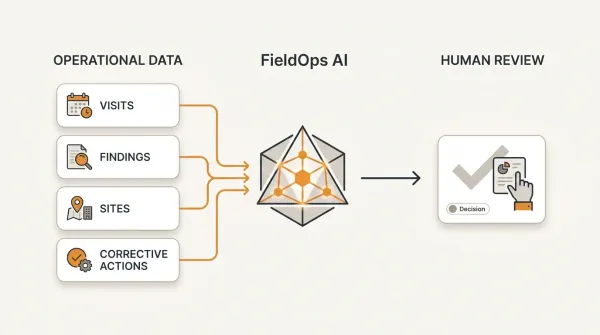
Where FieldOps fits
FieldOps is designed to treat findings and corrective actions as part of the monitoring workflow rather than as an afterthought to a field-data collection process.
A monitoring activity can be organized around:
Organization → Program → Project → Site → Visit
The visit can contain monitoring responses and performance information.
Findings can then be associated with the specific monitoring activity that generated them.
Actions can be assigned to responsible people with deadlines and statuses.
The workflow can continue through follow-up and verification.
This creates a connected operational chain:
Project
↓
Site
↓
Visit
↓
Finding
↓
Action
↓
Follow-up
↓
Resolution
The organization therefore does not have to treat its findings tracker as a separate spreadsheet sitting beside the monitoring system.
The finding becomes part of the monitoring record itself.
Field data collection can remain separate
This does not mean an organization has to abandon its existing field-data collection platform.
An organization may continue using:
- ODK,
- KoboToolbox,
- CommCare,
- DHIS2,
- or other systems
for the functions they already perform well.
The important question is what happens to the information after collection.
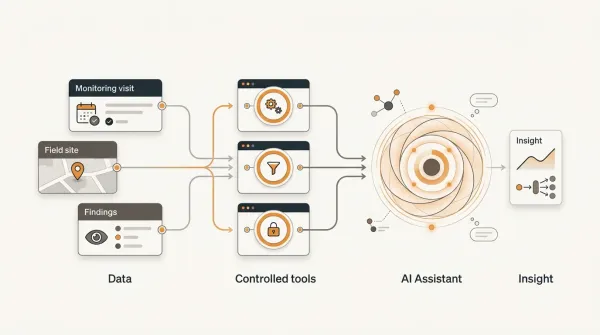
A mature workflow can look like:
ODK / KoboToolbox
↓
Field data
↓
FieldOps
↓
Project + Site + Visit
↓
Findings + Actions
↓
Performance
↓
Management decisions
This creates a clear distinction between collecting information and managing the operational response to that information.
Example: turning a monitoring finding into an action
Consider a facility monitoring visit.
The monitoring team observes:
The facility has no updated emergency referral directory.
The finding is recorded as:
Category: Service readiness
Severity: High
Site: Facility 014
Visit: July 2026 monitoring visit
The corrective action is:
Update the emergency referral directory and display it in the designated clinical area.
The action is assigned to:
Facility Manager
with a deadline of:
August 7, 2026
The manager submits evidence.
The M&E officer reviews the evidence.
The action is verified.
The finding is closed.
The organization now has a complete record:
What was wrong → what was done → who did it → when it was due → what evidence was provided → who verified it
That is considerably more useful than a spreadsheet cell containing:
"Complete."
The goal is not to eliminate Excel
Excel remains extremely useful.
Organizations should continue using it where it makes sense.
For example:
- ad hoc analysis,
- data exploration,
- calculations,
- one-off exports,
- modeling,
- and custom analysis.
The problem occurs when Excel becomes the permanent system of record for operational workflows that require:
- relationships,
- ownership,
- permissions,
- history,
- notifications,
- auditability,
- and workflow states.
At that point, a dedicated operational system can provide a more reliable foundation.
What a mature findings process looks like
A mature M&E findings process has a clear chain:
1. Identify
A monitoring activity identifies a problem.
2. Record
The finding is captured with sufficient context.
3. Classify
Severity and category are assigned.
4. Assign
An accountable person receives the corrective action.
5. Act
The responsible person addresses the issue.
6. Document
Evidence is provided where required.
7. Verify
The organization confirms that the action was adequately completed.
8. Close
The finding is formally resolved.
9. Learn
Recurring findings and patterns inform program improvement.
This final step is often overlooked.
Monitoring should not only identify problems.
It should help organizations learn from them.
Conclusion
The purpose of M&E is not simply to identify problems.
It is to help organizations understand performance and improve implementation.
That means a finding should not disappear into a PDF report or an Excel tracker.
It should become part of a workflow:
Finding → Action → Owner → Deadline → Evidence → Verification → Resolution
When this workflow is connected to:
Project → Site → Visit → Indicator
the organization gains a much stronger operational picture.
It can see not only what was observed, but:
- where it happened,
- why it matters,
- who is responsible,
- whether action has been taken,
- whether the action was verified,
- whether the problem is recurring,
- and how it affects program performance.
That is the difference between recording findings and managing findings.
For organizations using KoboToolbox, ODK or other field-data collection systems, the answer is not necessarily to replace the tools that collect the data.
The more important question is what happens after the form is submitted.
Good digital M&E does not stop at collecting evidence. It connects evidence to action and action to measurable improvement.
Key takeaways
-
An M&E finding should lead to a defined response, not simply appear in a report.
-
Findings and corrective actions are different concepts and should be managed separately.
-
Every corrective action should have clear ownership and, where appropriate, a deadline.
-
Completed actions should be distinguished from verified actions.
-
Findings should retain their connection to the project, site and monitoring visit that generated them.
-
Recurring findings can reveal systemic problems that individual monitoring reports may hide.
-
Structured findings make it possible to identify overdue actions, high-severity issues and sites requiring attention.
-
Excel remains valuable for analysis, but a dedicated workflow is often better suited to persistent corrective-action management.
-
Organizations using ODK or KoboToolbox do not necessarily need to replace their data collection tools.
-
The ultimate purpose of findings management is to move from evidence to action, verification and program improvement.
Frequently asked questions
What is an M&E findings tracker?
An M&E findings tracker is a structured record used to document issues identified through monitoring and track the corrective actions required to address them. It commonly includes the finding, site, project, severity, responsible person, action, deadline and status.
How do you track corrective actions in M&E?
A good corrective-action process records the finding, assigns an owner, defines the required action, sets a deadline, tracks progress, collects evidence where appropriate and verifies completion before closing the finding.
Why is Excel difficult for tracking M&E findings?
Excel can work well for small findings lists, but becomes harder to manage when organizations need relationships between projects, sites, visits, findings and actions, as well as permissions, audit history, workflow states, evidence and systematic follow-up.
What is the difference between a finding and a corrective action?
A finding describes a problem or observation identified through monitoring. A corrective action describes what the organization will do to address that problem. One finding can require multiple corrective actions.
Should every M&E finding have a deadline?
Where a corrective action can reasonably be time-bound, a deadline helps establish accountability and makes it possible to identify overdue actions. Some findings may instead require ongoing management or escalation according to organizational policy.
Should corrective actions be verified?
Where appropriate, yes. An action being marked "complete" by the responsible person does not necessarily prove that the problem has been adequately addressed. Verification provides an additional layer of accountability.
How can organizations identify recurring M&E findings?
Findings need consistent categories, site identifiers and links to previous monitoring records. Once these relationships are structured, organizations can compare findings across visits, reporting periods, sites and projects to identify recurring problems.
Can FieldOps manage M&E findings and corrective actions?
FieldOps is designed to connect findings and corrective actions to the operational monitoring workflow. Findings can be associated with projects, sites and visits, while actions can be tracked through assignment, deadlines, follow-up and resolution.
Move beyond data collection
FieldOps helps NGOs manage field visits, monitoring templates, findings, corrective actions, dashboards and donor reporting in one operational intelligence platform.
Learn more about FieldOps